Synthetic UX Research
How an agent should design, run, inspect, and report a browser-based UX study with uxtest.
1. Install uxtest
Install uxtest and its Python dependencies from the repository, then install the Chromium browser used by Playwright:
pip install git+https://github.com/expectedparrot/uxtest.git
python -m playwright install chromium
The package installs the tools used in this tutorial: uxtest captures and organizes browser studies, while EDSL provides ep for running image-evaluation jobs. Confirm that they are available and check the browser:
uxtest --version
ep info
uxtest doctor
uxtest doctor checks the uxtest package, EDSL import, Chromium launch, and optional report tooling. Fix a failed Chromium check before continuing; without a working browser, uxtest cannot capture the page or its screenshot.
uv sync, then prefix uxtest commands with uv run. The examples below use the installed uxtest command for readability.2. What uxtest is for
A web team often wants to know how a person might approach a page before it has time or budget for a full usability study. Is the purpose of the page apparent? Does a promising button lead where its label suggests? Can a visitor find product information without accidentally entering a signup flow? Does the mobile version create a different path from the desktop version?
uxtest turns questions like these into browser experiments. You give it a website, a task, one or more synthetic personas, and a stopping condition. It opens the site with Playwright, lets a scripted or EDSL-backed visitor decide what to do, and records the journey step by step. The useful product is not simply a pass/fail score. It is an inspectable chain of evidence: what was visible, what the visitor inferred, what action it attempted, what the browser did, and what appeared next.
3. Build a minimal issue-finding study
Before the larger walkthrough, here is the smallest useful study. We will create one HTML page with a long status line that cannot wrap and is clipped by its card. uxtest will capture the page at an iPhone viewport. It will then package that screenshot as an EDSL FileStore in jobs.ep; ep will run the image evaluation and save results.ep; finally, uxtest will ingest the structured finding.
Create the project directory
mkdir mobile-page-study
cd mobile-page-study
uxtest init
mkdir creates an isolated directory for this tutorial, and cd makes it the current working directory. uxtest init creates uxtest_store/, the project-local store for fixture plans, personas, studies, runs, screenshots, EDSL packages, and reports.
The command returns a JSON envelope. data.stdout identifies the new store:
Build the fixture plan
A fixture is the repeatable recipe for a study: the target URL, task, persona, page variant, browser driver, and device. Create the initial plan:
uxtest fixture new mobile-page-review \
  --url-template 'http://{host}:{port}/index.html' \
  --task 'Review this page on a phone and identify any visible interface problems. Explain exactly what is wrong and where it occurs.' \
  --success-criteria 'The visitor has inspected the page.' \
  --persona mobile-first --variant broken \
  --driver heuristic --device iphone
Each part has a specific job:
mobile-page-reviewis a neutral fixture id used by later commands. It describes the study’s scope, not an expected finding.--url-templateidentifies the page; uxtest fills in{host}and{port}from the server configuration.--tasksays what to inspect and what kind of answer is needed.--success-criteriadescribes when the capture has enough evidence.--persona mobile-firstassociates the run with a phone-oriented visitor profile.--variant brokennames this page version and becomes part of the generated study id.--driver heuristiccaptures browser evidence without using EDSL for navigation. The dedicated image job performs the model evaluation later.--device iphoneselects the mobile viewport, touch behavior, and mobile user agent.
This writes uxtest_store/fixtures/mobile-page-review/fixture.yaml. Add the two remaining settings:
uxtest fixture set mobile-page-review max_steps 1
uxtest fixture set mobile-page-review server \
  '{"host":"127.0.0.1","port":8782,"command":["python","-m","http.server","{port}","--bind","{host}"]}' \
  --json-value
max_steps 1 requests one observed browser state—the initial mobile page is all this test needs. The server object tells uxtest to start Python’s static server on localhost before the run and stop it afterward. --json-value tells the CLI to store the value as an object rather than a string.
Run uxtest fixture show mobile-page-review to inspect the complete generated plan.
Create the page under test
Create uxtest_store/fixtures/mobile-page-review/index.html. It sits beside fixture.yaml because the configured static server runs from that fixture directory:
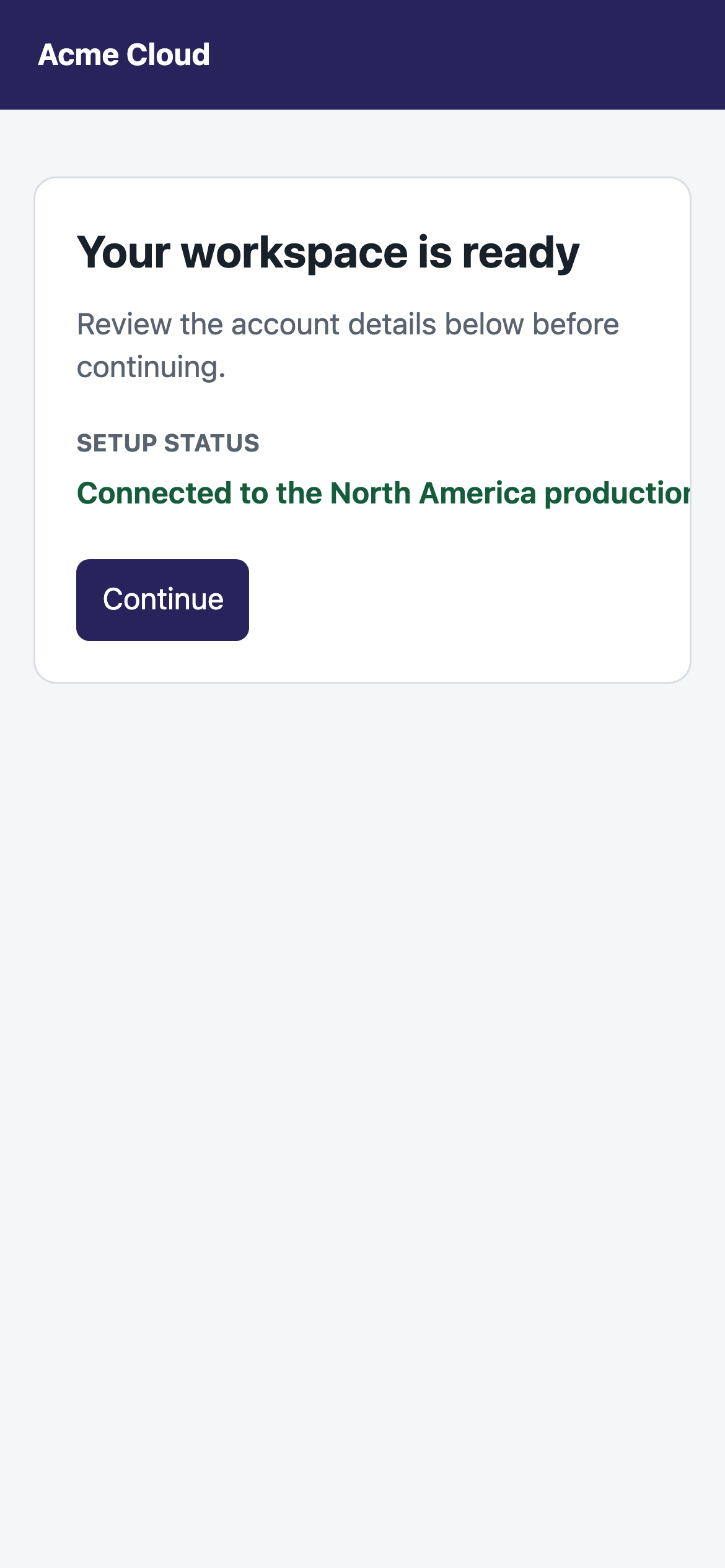
overflow: hidden. Inside it, the status line is forced to be 620px wide and forbidden from wrapping with white-space: nowrap. On a 390px-wide phone viewport, the sentence cannot fit, cannot move to a second line, and is cut off. We are planting an obvious visual defect so we can verify that the screenshot-evaluation workflow detects it.<!doctype html>
<html lang="en">
<head>
<meta charset="utf-8">
<meta name="viewport" content="width=device-width, initial-scale=1">
<title>Acme account</title>
<style>
* { box-sizing: border-box; }
body { margin: 0; background: #f5f6f8; font: 16px/1.45 system-ui, sans-serif; }
header { padding: 18px 20px; background: #29235c; color: white; font-weight: 700; }
main { margin: 36px auto; padding: 0 18px; }
.card { overflow: hidden; padding: 22px; border: 1px solid #d9dde3; border-radius: 12px; background: white; }
.status { width: 620px; overflow: hidden; white-space: nowrap; color: #145c3a; font-weight: 650; }
button { margin-top: 24px; padding: 10px 14px; background: #29235c; color: white; }
</style>
</head>
<body>
<header>Acme Cloud</header>
<main><section class="card">
<h1>Your workspace is ready</h1>
<p>Review the account details below before continuing.</p>
<strong>Setup status</strong>
<div class="status">Connected to the North America production workspace with automatic weekly backups enabled</div>
<button>Continue</button>
</section></main>
</body>
</html>Open the page and capture browser evidence
Now ask uxtest to run the fixture. uxtest starts the local web server, then uses Playwright—a tool that controls a real Chromium browser—to open index.html with the iPhone-sized viewport specified in the plan. Playwright takes a screenshot of what the browser actually renders, including content that is clipped, overlapping, or outside its container.
The heuristic driver keeps this capture stage deterministic. It does not ask an AI model whether the page looks good or bad. Its job here is to visit the page and preserve the evidence. The visual judgment happens in the EDSL image-evaluation job in the next step.
uxtest fixture run mobile-page-reviewThe relevant fields from the real command response are shown below. The date and four-character run suffix will differ on a new run:
ok: true means the browser capture completed. The first artifact is the run directory. Inside it, screenshots/step-001.png is the image Playwright captured, trace.jsonl records what the browser observed and did, and meta.json records the viewport, URL, persona, and outcome. The remaining paths are automatically generated summaries and reports. For this lesson, the screenshot is the important input to the next stage.
Give the screenshot a durable reference
At this point uxtest has collected evidence but has not asked EDSL to interpret the image. List the available captures:
uxtest image-review capturescapture_id is a SHA-256 reference derived from the screenshot bytes and its study/run identity. Like a Git commit, its first several characters are usually enough to identify it. This gives an agent one stable value to carry forward instead of parsing and recombining a study id, run id, and file path.
Package that capture for EDSL
prepare does not run a model. It resolves the capture reference and writes a portable EDSL job containing the image, review question, persona, and model configuration:
uxtest image-review prepare --capture 7d0a7a8Abbreviated hashes must contain at least seven characters and must resolve unambiguously. For a quick one-off workflow, uxtest image-review prepare --latest remains available. Explicit study and run ids are also accepted for compatibility.
The following is the structured portion of the actual response; absolute temporary paths are shortened to ...:
The package contains the question, model, reviewer, run metadata, and screenshot itself—not merely the screenshot path. Although next_command exposes the underlying EDSL command for inspection or custom execution, an agent does not need to copy its paths. Run the complete prepare → EDSL → ingest workflow with the same capture reference:
uxtest image-review run --capture 7d0a7a8uxtest resolves the capture, writes jobs.ep, passes its exact path and the matching results.ep destination to ep run, waits for EDSL, then ingests the result. The packages remain in the study for inspection, but path plumbing is not the caller’s responsibility.
What EDSL found
The result identifies more than a generic “mobile layout problem.” It names the affected content, describes the visible failure, assigns a severity, and links the finding to run-001-mobile-first-a8c8 and its screenshot. Those references let an agent or reviewer return to the exact browser evidence behind the finding.
The complete structured finding appears in data.findings. Absolute path prefixes are shortened below:
What we learned from this study
The workflow successfully recovered the defect we planted in the page. Playwright captured the clipped rendering rather than merely reading the complete sentence from the HTML. EDSL evaluated those pixels and recognized that the visible sentence was truncated. uxtest then preserved the model’s finding alongside the capture that supports it.
This is the core issue-finding loop: define the page and viewport, capture what a browser actually displays, evaluate the screenshot, and retain a structured finding tied to its evidence. The stored files preserve the separation between stages: step-001.png is the browser evidence, jobs.ep is the review specification, results.ep is EDSL’s response, and analysis/image_review/findings.json is the normalized result used by uxtest.
4. The larger walkthrough
The Acme example asked one visual question about one captured browser state. Northstar extends the same workflow into a multi-step assessment: the visitor can click through several pages, each step produces a screenshot and trace event, and we compare the complete journey across two versions of the site.
The principles do not change:
- Define the task, viewport, variants, and stopping rule before opening the browser.
- Use Playwright to capture what the browser displayed and what each action caused.
- Keep screenshots and trace events as the evidence; treat reports as generated views of that evidence.
- Use uxtest ids and capture hashes instead of constructing storage paths when a command accepts a reference.
- Keep model execution explicit. A scripted run establishes the controlled baseline; the EDSL version later replaces scripted choices with model-selected actions.
The new element is sequence. A single screenshot can reveal clipping, but it cannot tell us that a plausible “View examples” click eventually leads to login or that a Docs click repeatedly fails to navigate. For that, we need the ordered chain of screenshots, actions, URLs, and browser outcomes.
The question in the next study
We will study a fictional B2B product page called Northstar. Imagine that the product team is worried that visitors who want to learn about the product are being pushed into account creation too soon. The team has made a revised version with clearer product links and wants an inexpensive first check before recruiting people.
The bundled example therefore contains two versions of the same mobile page. The flawed version uses generic actions such as “Get started,” contains links that do not visibly advance, and can lead a curious visitor toward login. The clear version uses more specific product-learning links. We will ask the same task of both pages: decide which product area to explore and identify anything confusing.
Why begin with a scripted visitor?
We first run a deterministic path whose expected behavior is already known. This verifies that the local site, browser actions, screenshots, analysis, and regression rules are wired together correctly. Once that baseline works, we repeat the study with EDSL-backed personas that choose their own actions. Keeping the page and task fixed makes it easier to understand what the EDSL layer adds.
What this can teach us
If several visitors interpret a vague button the same way and the button repeatedly takes them somewhere unhelpful, uxtest preserves the traces and screenshots needed to identify the pattern, understand its cause, and test a design change.
By the end, you will know how a study is specified, how uxtest executes it, which files contain primary evidence, how to distinguish interface behavior from agent behavior, and how to turn a finding into a cautious next step.
5. Following one study from question to evidence
The following steps are one continuous investigation, not a tour of unrelated commands. They follow the same order as the first study: create a store, define and inspect the plan, let Playwright collect evidence, use stable references to inspect it, and then interpret the result. Commands assume an installed package; in this source repository, substitute uv run uxtest for uxtest.
Check the browser stack
What we are doing and why. Installation was handled at the start of the guide. Here we create a separate project directory and store for the Northstar assessment, then recheck the browser stack before collecting a longer trace. A missing browser is an environment failure, not a finding.
mkdir northstar-uxtest
cd northstar-uxtest
uxtest init
uxtest doctorThis transcript was captured from the tutorial run. The temporary directory and installed EDSL/pandoc paths will differ on another machine.
mkdir and cd isolate this study from the earlier Acme files. uxtest init creates the new uxtest_store/. doctor performs read-only dependency checks; it does not run a study or call a model.
What to learn from the output. Chromium is required to produce browser traces. EDSL is required only for the autonomous persona study later in the tutorial. Pandoc is optional until you request HTML or PDF narrative reports. If Chromium is missing, run python -m playwright install chromium.
Copy the complete example, not just its YAML
What we are doing and why. A uxtest fixture describes an experiment, but this particular experiment also owns its target website. We copy the entire example so the test plan, known-flaw definitions, local web server, and page assets remain a reproducible unit.
uxtest examples copy ./northstar --name saas
cd northstar
uxtest fixture register . --name northstar
uxtest fixture show northstar
uxtest fixture validate northstar
lsThe YAML above is shortened only where the following expandable plan prints the full value. All paths, field names, and command messages come from the captured run.
The copied directory contains two experiment plans. regression.yaml uses a scripted driver, so it is the deterministic baseline. regression-edsl.yaml asks three EDSL personas to make autonomous choices. expected_flaws.yaml states which behaviors should occur only in the flawed page. The remaining files implement the local site.
Here is what each command contributes. examples copy copies the complete Northstar project to the explicit path ./northstar; the path is necessary because these are editable source files, not a stored object reference. cd northstar moves into that project while uxtest continues to find the store in its parent directory. fixture register assigns the copied plan the stable name northstar. From then on, commands use that name instead of a YAML path. fixture show returns the parsed plan, and fixture validate checks required fields without launching Chromium.
fixture register copies the plan and its companion server, expected-flaw definitions, and static files into uxtest_store/fixtures/northstar/. From this point onward, the fixture has a stable id instead of depending on a remembered YAML path.
What to learn from this step. uxtest does not hide the research design in an opaque service. The plan and target can be versioned together, reviewed with fixture show, validated without running, and rerun later.
Read the research design before running it
What we are doing and why. Before generating evidence, we inspect the assumptions that will shape it. The task tells the visitor what goal to pursue. The persona affects how the visitor approaches that goal. The device controls what is visible. The step limit determines how long the attempt may continue. The variant list says which experiences will be compared.
The complete fixture is shown below so you can see exactly what sets up the exploration. Expand each file. Notice that the fixture describes behavior and execution; it does not contain a prewritten conclusion.
regression.yamlDeterministic baseline: target, task, persona, browser, execution, analysis, and variants.
id: northstar-saas
name: Northstar SaaS Fixture
comparison_title: Northstar SaaS Fixture Regression
comparison_output: northstar-saas-fixture-regression.html
server:
  host: 127.0.0.1
  port: 8776
  command:
    - python
    - ./server.py
    - --host
    - "{host}"
    - --port
    - "{port}"
url_template: http://{host}:{port}/?variant={variant}
study_title: Northstar SaaS Fixture ({variant})
task: >
  You are evaluating Northstar, a B2B research platform. Figure out which
  product area you would explore next and identify anything confusing.
success_criteria: The product areas, docs route, or quickstart route have been inspected.
personas:
  - mobile-first
runs_per_persona: 1
driver: scripted
device: iphone
max_steps: 6
max_concurrent_runs: 1
keep_runs: 3
analysis_driver: local
animation_delay: 250
animation_max_width: 520
expected_flaws: expected_flaws.yaml
variants:
  - name: flawed
- name: clearexpected_flaws.yamlNamed hypotheses for the flawed variant and a positive check for the clear variant.
flaws:
  - id: login_detour
    expected_in: flawed
    absent_in: clear
    description: Exploratory product-learning actions lead users into login.
  - id: dead_docs_link
    expected_in: flawed
    absent_in: clear
    description: Docs and pricing links acknowledge clicks without navigating.
  - id: generic_cta_confusion
    expected_in: flawed
    absent_in: clear
    description: Generic CTAs such as Open example, Continue, and Get started mislead users.
  - id: repeated_non_navigation
    expected_in: flawed
    absent_in: clear
    description: Users repeat the same non-navigating action while trying to learn more.
checks:
  - id: first_click_clear_explores_products
    type: first_click
    expected_in: clear
    action_contains: explore products
    final_url_contains: /designer
    description: Clear variant should route the first product-learning click
into product detail, not auth.regression-edsl.yamlThe exploratory version: three personas make their own browser decisions through EDSL.
id: northstar-saas-edsl
name: Northstar SaaS EDSL Fixture
mode: edsl-personas
comparison_title: Northstar SaaS EDSL Persona Regression
comparison_output: northstar-saas-edsl-regression.html
server:
  host: 127.0.0.1
  port: 8776
  command: [python, ./server.py, --host, "{host}", --port, "{port}"]
url_template: http://{host}:{port}/?variant={variant}
study_title: Northstar SaaS EDSL ({variant})
task: >
  You are evaluating Expected Parrot's Northstar-style product page as a
  potential customer. Figure out which product or resource you would click next,
  and call out anything confusing or misleading as you try to learn what the
  product does.
success_criteria: The persona has inspected at least one product area or resource and can explain what they would do next.
personas:
  - mobile-first
  - low-confidence
  - price-sensitive
runs_per_persona: 1
driver: edsl
device: iphone
max_steps: 6
max_concurrent_runs: 2
keep_runs: 6
analysis_driver: local
animation_delay: 250
animation_max_width: 520
expected_flaws: expected_flaws.yaml
eval_policy: threshold
minimum_recovered_expected: 1
overrides:
  model: gpt-4o
variants:
  - name: flawed
  - name: clear
What the plan means. The task is deliberately open enough to permit navigation choices, but bounded enough that we can recognize progress. Success means the visitor has inspected a product, documentation, or quickstart route. The expected result is not merely “flawed loses.” It is specific: the clear page’s first product-learning click should reach /designer, while the flawed page may expose login detours, dead links, generic calls to action, or repeated non-navigation.
uxtest fixture show northstar displays the reusable experiment plan before execution. After it creates studies, uxtest show <study-id> --json displays a materialized study with its resolved variant URL and status.Run both variants with one command
What we are doing and why. We now execute the deterministic baseline. uxtest will apply the same research task, mobile viewport, step budget, analysis, and evaluation rules to both page variants. Holding those conditions constant makes the page variant the meaningful difference.
uxtest fixture run northstarThe fixture name northstar is the registered reference from step 2. No YAML or server path is needed. This one command starts the fixture’s server, creates one study for each variant, drives both browser journeys, records every step, analyzes them, and creates the comparison.
Captured output: generated artifactsThis is the artifact list from the JSON envelope. Run ids contain random suffixes and will differ.
The fixture runner launches the server on port 8776, materializes one study per variant, opens an iPhone-sized browser, runs the scripted visitor, captures each step, analyzes the traces, evaluates the named flaws, builds animations, and writes a comparison. “Scripted” means the choices are predetermined for repeatability; Playwright still performs the actions against the real page.
The paths in artifacts are outputs, not inputs the agent must reconstruct. The two runs/... entries identify the primary evidence directories. The analysis/... entries are generated views for each variant, and the final comparisons/... entry is the side-by-side report. Later commands use study and run ids; direct paths are only needed when opening a generated HTML file or inspecting a raw evidence file.
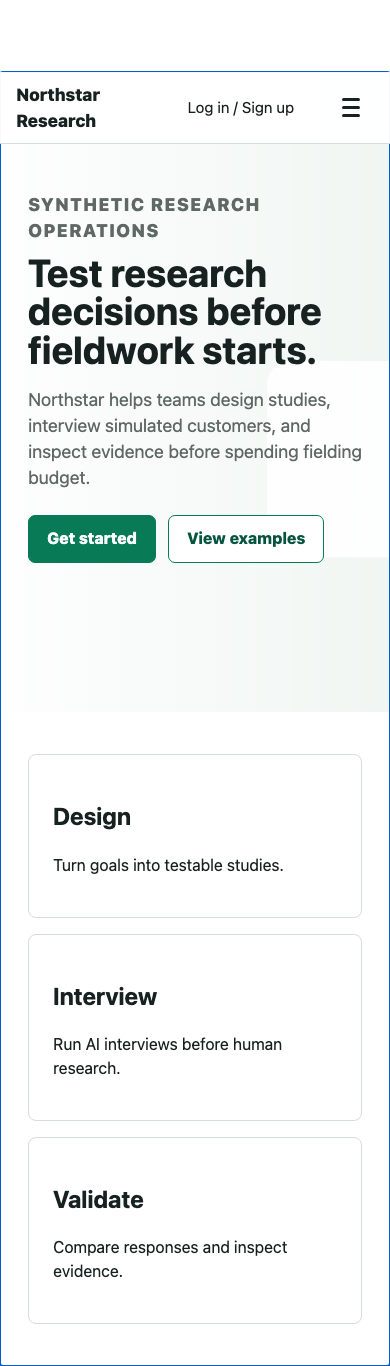
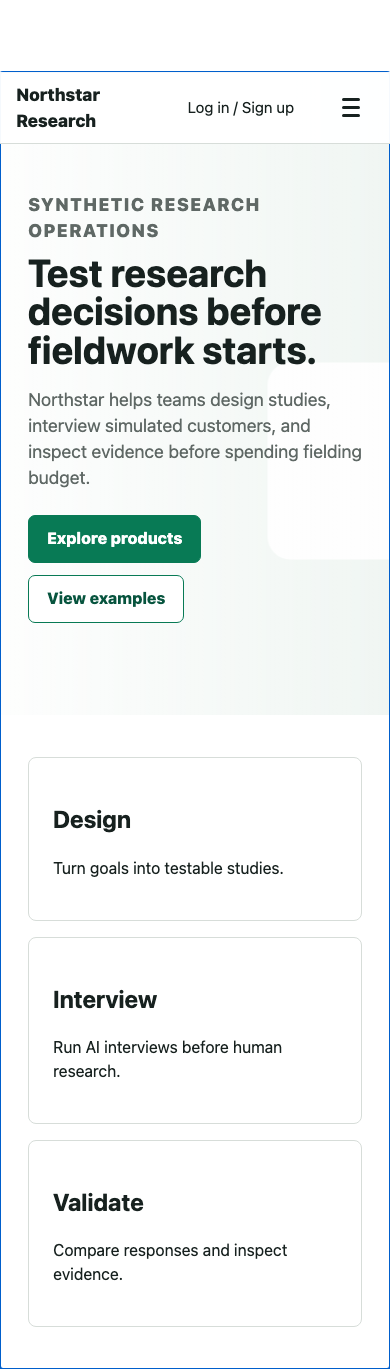
What you are seeing. These are the actual pages the browser receives. Compare the action labels, not just the visual polish. A visitor trying to learn about the product must infer what “Get started” will do in the flawed version; the clear version gives that visitor a more explicit route. The screenshots alone do not prove friction. They provide the visual context needed to judge whether the later browser action was reasonable.
You do not need to start the server separately. On exit—even a failed check—the fixture runner owns server cleanup.
Find what the run produced
What we are doing and why. We pause before reading the report to understand the evidence model. uxtest stores the study definition separately from individual runs. Each run contains raw trace events and screenshots; analysis and reports are derived from them. If a summary ever seems wrong, the run is where we check it.
First, ask for a project-level count:
uxtest --human statusThis confirms that one registered fixture produced two studies—one per variant—and one run per study. “Incomplete runs: 0” means neither browser session was left without a terminal outcome.
Next, list the studies to obtain their generated ids. Unlike the explicitly human-formatted status above, this uses uxtest's default agent interface:
uxtest study listThe real response includes the remaining study fields, such as creation time, success criteria, tags, and the source path. The key point is that data is an array—not prose an agent must split into columns. An agent selects the object whose tags contain variant-flawed or variant-clear and carries its id into the next command. It does not parse an artifact path to recover the id. The date portion will reflect the day you run the fixture. The status complete describes browser execution; it does not by itself say that the task succeeded.
Use one of those ids for a compact human-readable summary:
uxtest --human show 2026-07-22-northstar-saas-fixture-flawedTitle: Northstar SaaS Fixture (flawed)
Status: complete
URL: http://127.0.0.1:8776/?variant=flawed
Personas: mobile-first
This is a quick identity check: it confirms that we selected the flawed URL and the intended persona. It does not include run events.
Finally, request the complete materialized study record as JSON:
uxtest show 2026-07-22-northstar-saas-fixture-flawedThe envelope is stable across uxtest commands. Here, data contains the structured study record. Commands that write files populate artifacts; failures set ok false and populate error. Within the study, the {variant} placeholder has resolved to flawed, and fixture-level driver and device settings have become tags.
The store now contains a reusable mobile-first persona and one study directory for each variant. Inside each study, study.yaml is the resolved plan, runs/<run-id>/trace.jsonl and its screenshots are the primary evidence, and analysis/ contains derived findings, scores, and reports. The side-by-side result is written under uxtest_store/comparisons/.
uxtest show <study-id> returns the full materialized plan in the standard envelope—the resolved URL, task, personas, and status after the fixture has created it. Use uxtest --human show <study-id> only when a compact terminal summary is more useful.
What to learn from this step. A report is not the source of truth. It can be regenerated as analysis improves. The trace and screenshot sequence are the durable record of what happened in the browser.
Read one trace as a causal chain
What we are doing and why. A completion percentage compresses too much. We inspect a flawed-page run to decide whether an apparent problem belongs to the interface, the synthetic visitor, or the test setup.
The study id below is the data[].id selected from uxtest study list in the preceding step. trace finds every run inside that study, so no run path is required:
uxtest --human trace 2026-07-22-northstar-saas-fixture-flawedGenerate the image-backed journey tree
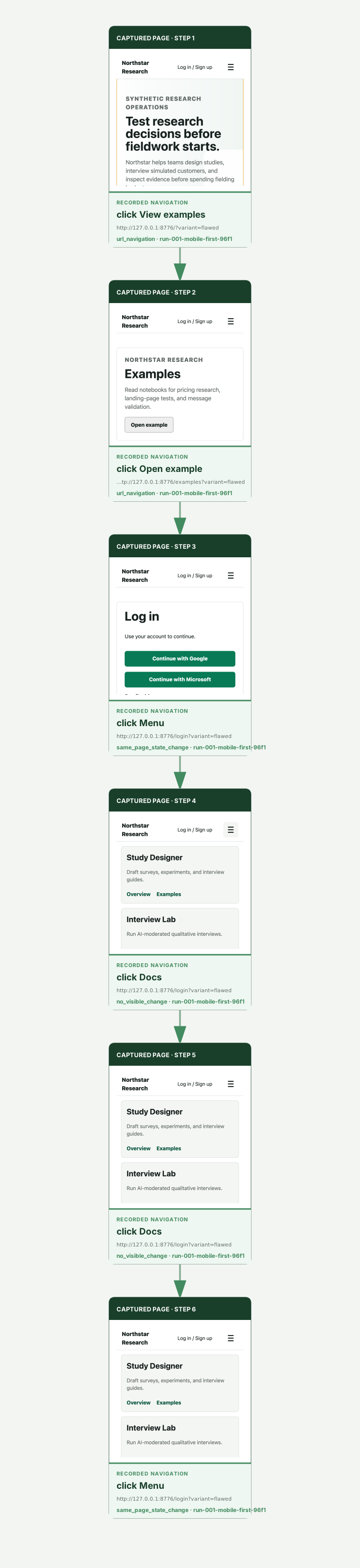
The text trace is precise, but it makes the reader reconstruct the visual sequence mentally. Generate a browser view whose nodes are the captured screenshots and whose edges are the recorded actions:
uxtest journey 2026-07-22-northstar-saas-fixture-flawedjourney reads the retained traces; it does not rerun the browser or call EDSL. It writes a self-contained SVG with the screenshots embedded inside it. For one run, it produces the click-through chain shown below. With several runs, common prefixes are merged and the diagram branches at the first different action or browser outcome. Reports embed this same SVG when it is available. Add --open to open it immediately.
The trace output supplies the run id run-001-mobile-first-96f1. We use that exact id only when requesting the complete record for this particular journey. The study id and run id together are a durable evidence reference; the command resolves their storage path:
uxtest show 2026-07-22-northstar-saas-fixture-flawed \
  run-001-mobile-first-96f1 --trace
Captured output: complete run JSON envelopeExpand to inspect the envelope and its recorded persona, browser configuration, all six observations, actions, outcomes, and screenshots.
{
"costs": {},
"environment": {
"browser": "chromium",
"os": "darwin-arm64",
"playwright_version": "1.60.0",
"uxtest_version": "0.1.0"
},
"final_url": "http://127.0.0.1:8776/login?variant=flawed",
"finished_at": "2026-07-22T12:36:41Z",
"outcome": "max_steps",
"outcome_detail": "Reached max_steps=6",
"persona_instance": {
"name": "mobile-first",
"resolved": {
"age_range": [
20,
40
],
"device_familiarity": "mobile",
"patience": "medium",
"reading_style": "scans headings",
"tech_literacy": "high"
},
"snapshot": {
"accessibility": {},
"attributes": {
"age_range": [
20,
40
],
"device_familiarity": "mobile",
"patience": "medium",
"reading_style": "scans headings",
"tech_literacy": "high"
},
"description": "Phone-first user who expects compact, direct flows",
"frustration": {
"per_step_decay": 1,
"threshold": 6
},
"goals_bias": "Looks for visible primary actions, direct navigation, and minimal friction.",
"name": "mobile-first",
"schema_version": 1
},
"source_sha256": "b48004191494f40b2c486e14b50352765a4e83374088d9a09a6d554031830a22"
},
"resolved_config": {
"a11y_audit": true,
"device_scale_factor": 3,
"has_touch": true,
"is_mobile": true,
"max_steps": 30,
"model": "gpt-4o",
"runs_per_persona": 1,
"screenshot": "full",
"screenshot_format": "png",
"screenshot_quality": 80,
"temperature": 0.7,
"user_agent": "Mozilla/5.0 (iPhone; CPU iPhone OS 17_0 like Mac OS X) AppleWebKit/605.1.15 (KHTML, like Gecko) Version/17.0 Mobile/15E148 Safari/604.1",
"viewport": {
"height": 844,
"width": 390
}
},
"run_id": "run-001-mobile-first-96f1",
"schema_version": 1,
"seed": null,
"started_at": "2026-07-22T12:36:26Z",
"steps_taken": 6,
"study_id": "2026-07-22-northstar-saas-fixture-flawed",
"trace": [
{
"action": {
"ref": "e5",
"text": "View examples",
"type": "click",
"value": null
},
"event_type": "step",
"frustration": 2,
"model_decision": {
"driver": "scripted",
"edsl": {},
"frustration": 2,
"raw_response": null,
"status": "continue",
"thinking": "Click view examples to follow the fixture's flawed discovery path."
},
"observation": {
"a11y_audit": null,
"headings": [
{
"in_viewport": false,
"level": "h2",
"text": "Study Designer",
"y": 72
},
{
"in_viewport": false,
"level": "h2",
"text": "Interview Lab",
"y": 72
},
{
"in_viewport": false,
"level": "h2",
"text": "API & SDK",
"y": 72
},
{
"in_viewport": true,
"level": "h1",
"text": "Test research decisions before fieldwork starts.",
"y": 254
},
{
"in_viewport": true,
"level": "h2",
"text": "Design",
"y": 799
},
{
"in_viewport": false,
"level": "h2",
"text": "Interview",
"y": 979
},
{
"in_viewport": false,
"level": "h2",
"text": "Validate",
"y": 1182
}
],
"interactive_elements": 5,
"interactive_elements_sample": [
{
"context": "Northstar Research Log in / Sign up",
"label": "Northstar Research",
"label_source": "innerText",
"name": "",
"ref": "e1",
"role": "",
"selector_hint": "[data-uxtest-ref=\"e1\"]",
"tag": "a",
"type": "",
"value": ""
},
{
"context": "Northstar Research Log in / Sign up",
"label": "Log in / Sign up",
"label_source": "innerText",
"name": "",
"ref": "e2",
"role": "",
"selector_hint": "[data-uxtest-ref=\"e2\"]",
"tag": "a",
"type": "",
"value": ""
},
{
"context": "Northstar Research Log in / Sign up",
"label": "Menu",
"label_source": "inferred-menu-button",
"name": "",
"ref": "e3",
"role": "",
"selector_hint": "[data-uxtest-ref=\"e3\"]",
"tag": "button",
"type": "button",
"value": ""
},
{
"context": "Test research decisions before fieldwork starts.",
"label": "Get started",
"label_source": "innerText",
"name": "",
"ref": "e4",
"role": "",
"selector_hint": "[data-uxtest-ref=\"e4\"]",
"tag": "a",
"type": "",
"value": ""
},
{
"context": "Test research decisions before fieldwork starts.",
"label": "View examples",
"label_source": "innerText",
"name": "",
"ref": "e5",
"role": "",
"selector_hint": "[data-uxtest-ref=\"e5\"]",
"tag": "a",
"type": "",
"value": ""
}
],
"screenshot": "screenshots/step-001.png",
"visible_text_preview": "Northstar Research\nLog in / Sign up\nSynthetic research operations\nTest research decisions before fieldwork starts.\nNorthstar helps teams design studies, interview simulated customers, and inspect evidence before spending fielding budget.\nGet started\nView examples\nDesign\nTurn goals into testable studies."
},
"page_title": "Northstar Research",
"result": {
"action_outcome": "url_navigation",
"console_errors": 0,
"final_url": "http://127.0.0.1:8776/examples?variant=flawed",
"navigation": true,
"ok": true,
"open_pages_delta": 0,
"state_change": true,
"url_change_type": "path"
},
"schema_version": 1,
"status": "continue",
"step": 1,
"stop_signal": {
"enough_evidence": false,
"should_stop_if_exploratory": false
},
"thinking": "Click view examples to follow the fixture's flawed discovery path.",
"ts": "2026-07-22T12:36:27Z",
"url": "http://127.0.0.1:8776/?variant=flawed"
},
{
"action": {
"ref": "e4",
"text": "Open example",
"type": "click",
"value": null
},
"event_type": "step",
"frustration": 2,
"model_decision": {
"driver": "scripted",
"edsl": {},
"frustration": 2,
"raw_response": null,
"status": "continue",
"thinking": "Click open example to follow the fixture's flawed discovery path."
},
"observation": {
"a11y_audit": null,
"headings": [
{
"in_viewport": false,
"level": "h2",
"text": "Study Designer",
"y": 0
},
{
"in_viewport": false,
"level": "h2",
"text": "Interview Lab",
"y": 0
},
{
"in_viewport": false,
"level": "h2",
"text": "API & SDK",
"y": 0
},
{
"in_viewport": true,
"level": "h1",
"text": "Examples",
"y": 177
}
],
"interactive_elements": 4,
"interactive_elements_sample": [
{
"context": "Northstar Research Log in / Sign up",
"label": "Northstar Research",
"label_source": "innerText",
"name": "",
"ref": "e1",
"role": "",
"selector_hint": "[data-uxtest-ref=\"e1\"]",
"tag": "a",
"type": "",
"value": ""
},
{
"context": "Northstar Research Log in / Sign up",
"label": "Log in / Sign up",
"label_source": "innerText",
"name": "",
"ref": "e2",
"role": "",
"selector_hint": "[data-uxtest-ref=\"e2\"]",
"tag": "a",
"type": "",
"value": ""
},
{
"context": "Northstar Research Log in / Sign up",
"label": "Menu",
"label_source": "inferred-menu-button",
"name": "",
"ref": "e3",
"role": "",
"selector_hint": "[data-uxtest-ref=\"e3\"]",
"tag": "button",
"type": "button",
"value": ""
},
{
"context": "Examples",
"label": "Open example",
"label_source": "innerText",
"name": "",
"ref": "e4",
"role": "",
"selector_hint": "[data-uxtest-ref=\"e4\"]",
"tag": "a",
"type": "",
"value": ""
}
],
"screenshot": "screenshots/step-002.png",
"visible_text_preview": "Northstar Research\nLog in / Sign up\nNorthstar Research\nExamples\nRead notebooks for pricing research, landing-page tests, and message validation.\nOpen example"
},
"page_title": "Northstar Research",
"result": {
"action_outcome": "url_navigation",
"console_errors": 0,
"final_url": "http://127.0.0.1:8776/login?variant=flawed",
"navigation": true,
"ok": true,
"open_pages_delta": 0,
"state_change": true,
"url_change_type": "path"
},
"schema_version": 1,
"status": "continue",
"step": 2,
"stop_signal": {
"enough_evidence": false,
"should_stop_if_exploratory": false
},
"thinking": "Click open example to follow the fixture's flawed discovery path.",
"ts": "2026-07-22T12:36:28Z",
"url": "http://127.0.0.1:8776/examples?variant=flawed"
},
{
"action": {
"ref": "e3",
"text": "Menu",
"type": "click",
"value": null
},
"event_type": "step",
"frustration": 2,
"model_decision": {
"driver": "scripted",
"edsl": {},
"frustration": 2,
"raw_response": null,
"status": "continue",
"thinking": "Click menu to follow the fixture's flawed discovery path."
},
"observation": {
"a11y_audit": null,
"headings": [
{
"in_viewport": false,
"level": "h2",
"text": "Study Designer",
"y": 0
},
{
"in_viewport": false,
"level": "h2",
"text": "Interview Lab",
"y": 0
},
{
"in_viewport": false,
"level": "h2",
"text": "API & SDK",
"y": 0
},
{
"in_viewport": true,
"level": "h1",
"text": "Log in",
"y": 141
}
],
"interactive_elements": 8,
"interactive_elements_sample": [
{
"context": "Northstar Research Log in / Sign up",
"label": "Northstar Research",
"label_source": "innerText",
"name": "",
"ref": "e1",
"role": "",
"selector_hint": "[data-uxtest-ref=\"e1\"]",
"tag": "a",
"type": "",
"value": ""
},
{
"context": "Northstar Research Log in / Sign up",
"label": "Log in / Sign up",
"label_source": "innerText",
"name": "",
"ref": "e2",
"role": "",
"selector_hint": "[data-uxtest-ref=\"e2\"]",
"tag": "a",
"type": "",
"value": ""
},
{
"context": "Northstar Research Log in / Sign up",
"label": "Menu",
"label_source": "inferred-menu-button",
"name": "",
"ref": "e3",
"role": "",
"selector_hint": "[data-uxtest-ref=\"e3\"]",
"tag": "button",
"type": "button",
"value": ""
},
{
"context": "Log in",
"label": "Continue with Google",
"label_source": "innerText",
"name": "",
"ref": "e4",
"role": "",
"selector_hint": "[data-uxtest-ref=\"e4\"]",
"tag": "button",
"type": "button",
"value": ""
},
{
"context": "Log in",
"label": "Continue with Microsoft",
"label_source": "innerText",
"name": "",
"ref": "e5",
"role": "",
"selector_hint": "[data-uxtest-ref=\"e5\"]",
"tag": "button",
"type": "button",
"value": ""
},
{
"context": "Log in",
"label": "Enter your email address",
"label_source": "placeholder",
"name": "",
"ref": "e6",
"role": "",
"selector_hint": "[data-uxtest-ref=\"e6\"]",
"tag": "input",
"type": "",
"value": ""
},
{
"context": "Log in",
"label": "Enter your password",
"label_source": "placeholder",
"name": "",
"ref": "e7",
"role": "",
"selector_hint": "[data-uxtest-ref=\"e7\"]",
"tag": "input",
"type": "password",
"value": ""
},
{
"context": "Log in",
"label": "Continue",
"label_source": "innerText",
"name": "",
"ref": "e8",
"role": "",
"selector_hint": "[data-uxtest-ref=\"e8\"]",
"tag": "button",
"type": "button",
"value": ""
}
],
"screenshot": "screenshots/step-003.png",
"visible_text_preview": "Northstar Research\nLog in / Sign up\nLog in\nUse your account to continue.\nContinue with Google\nContinue with Microsoft\nEmail address\nPassword\nContinue"
},
"page_title": "Northstar Research",
"result": {
"action_outcome": "same_page_state_change",
"console_errors": 0,
"final_url": "http://127.0.0.1:8776/login?variant=flawed",
"navigation": false,
"ok": true,
"open_pages_delta": 0,
"state_change": true,
"url_change_type": "none"
},
"schema_version": 1,
"status": "continue",
"step": 3,
"stop_signal": {
"enough_evidence": false,
"should_stop_if_exploratory": false
},
"thinking": "Click menu to follow the fixture's flawed discovery path.",
"ts": "2026-07-22T12:36:31Z",
"url": "http://127.0.0.1:8776/login?variant=flawed"
},
{
"action": {
"ref": "e8",
"text": "Docs",
"type": "click",
"value": null
},
"event_type": "step",
"frustration": 2,
"model_decision": {
"driver": "scripted",
"edsl": {},
"frustration": 2,
"raw_response": null,
"status": "continue",
"thinking": "Click docs to follow the fixture's flawed discovery path."
},
"observation": {
"a11y_audit": null,
"headings": [
{
"in_viewport": true,
"level": "h2",
"text": "Study Designer",
"y": 103
},
{
"in_viewport": true,
"level": "h2",
"text": "Interview Lab",
"y": 293
},
{
"in_viewport": true,
"level": "h2",
"text": "API & SDK",
"y": 483
},
{
"in_viewport": true,
"level": "h1",
"text": "Log in",
"y": 141
}
],
"interactive_elements": 14,
"interactive_elements_sample": [
{
"context": "Northstar Research Log in / Sign up",
"label": "Northstar Research",
"label_source": "innerText",
"name": "",
"ref": "e1",
"role": "",
"selector_hint": "[data-uxtest-ref=\"e1\"]",
"tag": "a",
"type": "",
"value": ""
},
{
"context": "Northstar Research Log in / Sign up",
"label": "Log in / Sign up",
"label_source": "innerText",
"name": "",
"ref": "e2",
"role": "",
"selector_hint": "[data-uxtest-ref=\"e2\"]",
"tag": "a",
"type": "",
"value": ""
},
{
"context": "Northstar Research Log in / Sign up",
"label": "Menu",
"label_source": "inferred-menu-button",
"name": "",
"ref": "e3",
"role": "",
"selector_hint": "[data-uxtest-ref=\"e3\"]",
"tag": "button",
"type": "button",
"value": ""
},
{
"context": "Log in",
"label": "Overview",
"label_source": "innerText",
"name": "",
"ref": "e4",
"role": "",
"selector_hint": "[data-uxtest-ref=\"e4\"]",
"tag": "a",
"type": "",
"value": ""
},
{
"context": "Log in",
"label": "Examples",
"label_source": "innerText",
"name": "",
"ref": "e5",
"role": "",
"selector_hint": "[data-uxtest-ref=\"e5\"]",
"tag": "a",
"type": "",
"value": ""
},
{
"context": "Interview Lab",
"label": "How it works",
"label_source": "innerText",
"name": "",
"ref": "e6",
"role": "",
"selector_hint": "[data-uxtest-ref=\"e6\"]",
"tag": "a",
"type": "",
"value": ""
},
{
"context": "Interview Lab",
"label": "Examples",
"label_source": "innerText",
"name": "",
"ref": "e7",
"role": "",
"selector_hint": "[data-uxtest-ref=\"e7\"]",
"tag": "a",
"type": "",
"value": ""
},
{
"context": "API & SDK",
"label": "Docs",
"label_source": "innerText",
"name": "",
"ref": "e8",
"role": "",
"selector_hint": "[data-uxtest-ref=\"e8\"]",
"tag": "a",
"type": "",
"value": ""
},
{
"context": "API & SDK",
"label": "Quickstart",
"label_source": "innerText",
"name": "",
"ref": "e9",
"role": "",
"selector_hint": "[data-uxtest-ref=\"e9\"]",
"tag": "a",
"type": "",
"value": ""
},
{
"context": "Log in",
"label": "Continue with Google",
"label_source": "innerText",
"name": "",
"ref": "e10",
"role": "",
"selector_hint": "[data-uxtest-ref=\"e10\"]",
"tag": "button",
"type": "button",
"value": ""
},
{
"context": "Interview Lab",
"label": "Continue with Microsoft",
"label_source": "innerText",
"name": "",
"ref": "e11",
"role": "",
"selector_hint": "[data-uxtest-ref=\"e11\"]",
"tag": "button",
"type": "button",
"value": ""
},
{
"context": "Interview Lab",
"label": "Enter your email address",
"label_source": "placeholder",
"name": "",
"ref": "e12",
"role": "",
"selector_hint": "[data-uxtest-ref=\"e12\"]",
"tag": "input",
"type": "",
"value": ""
},
{
"context": "Interview Lab",
"label": "Enter your password",
"label_source": "placeholder",
"name": "",
"ref": "e13",
"role": "",
"selector_hint": "[data-uxtest-ref=\"e13\"]",
"tag": "input",
"type": "password",
"value": ""
},
{
"context": "API & SDK",
"label": "Continue",
"label_source": "innerText",
"name": "",
"ref": "e14",
"role": "",
"selector_hint": "[data-uxtest-ref=\"e14\"]",
"tag": "button",
"type": "button",
"value": ""
}
],
"screenshot": "screenshots/step-004.png",
"visible_text_preview": "Northstar Research\nLog in / Sign up\nStudy Designer\nDraft surveys, experiments, and interview guides.\nOverview\nExamples\nInterview Lab\nRun AI-moderated qualitative interviews.\nHow it works\nExamples\nAPI & SDK\nBuild research workflows in code.\nDocs\nQuickstart\nLog in\nUse your account to continue.\nContinue with Google\nContinue with Microsoft\nEmail address\nPassword\nContinue"
},
"page_title": "Northstar Research",
"result": {
"action_outcome": "no_visible_change",
"console_errors": 0,
"final_url": "http://127.0.0.1:8776/login?variant=flawed",
"navigation": false,
"ok": true,
"open_pages_delta": 0,
"state_change": false,
"url_change_type": "none"
},
"schema_version": 1,
"status": "continue",
"step": 4,
"stop_signal": {
"enough_evidence": true,
"should_stop_if_exploratory": true
},
"thinking": "Click docs to follow the fixture's flawed discovery path.",
"ts": "2026-07-22T12:36:34Z",
"url": "http://127.0.0.1:8776/login?variant=flawed"
},
{
"action": {
"ref": "e8",
"text": "Docs",
"type": "click",
"value": null
},
"event_type": "step",
"frustration": 2,
"model_decision": {
"driver": "scripted",
"edsl": {},
"frustration": 2,
"raw_response": null,
"status": "continue",
"thinking": "Click docs to follow the fixture's flawed discovery path."
},
"observation": {
"a11y_audit": null,
"headings": [
{
"in_viewport": true,
"level": "h2",
"text": "Study Designer",
"y": 103
},
{
"in_viewport": true,
"level": "h2",
"text": "Interview Lab",
"y": 293
},
{
"in_viewport": true,
"level": "h2",
"text": "API & SDK",
"y": 483
},
{
"in_viewport": true,
"level": "h1",
"text": "Log in",
"y": 141
}
],
"interactive_elements": 14,
"interactive_elements_sample": [
{
"context": "Northstar Research Log in / Sign up",
"label": "Northstar Research",
"label_source": "innerText",
"name": "",
"ref": "e1",
"role": "",
"selector_hint": "[data-uxtest-ref=\"e1\"]",
"tag": "a",
"type": "",
"value": ""
},
{
"context": "Northstar Research Log in / Sign up",
"label": "Log in / Sign up",
"label_source": "innerText",
"name": "",
"ref": "e2",
"role": "",
"selector_hint": "[data-uxtest-ref=\"e2\"]",
"tag": "a",
"type": "",
"value": ""
},
{
"context": "Northstar Research Log in / Sign up",
"label": "Menu",
"label_source": "inferred-menu-button",
"name": "",
"ref": "e3",
"role": "",
"selector_hint": "[data-uxtest-ref=\"e3\"]",
"tag": "button",
"type": "button",
"value": ""
},
{
"context": "Log in",
"label": "Overview",
"label_source": "innerText",
"name": "",
"ref": "e4",
"role": "",
"selector_hint": "[data-uxtest-ref=\"e4\"]",
"tag": "a",
"type": "",
"value": ""
},
{
"context": "Log in",
"label": "Examples",
"label_source": "innerText",
"name": "",
"ref": "e5",
"role": "",
"selector_hint": "[data-uxtest-ref=\"e5\"]",
"tag": "a",
"type": "",
"value": ""
},
{
"context": "Interview Lab",
"label": "How it works",
"label_source": "innerText",
"name": "",
"ref": "e6",
"role": "",
"selector_hint": "[data-uxtest-ref=\"e6\"]",
"tag": "a",
"type": "",
"value": ""
},
{
"context": "Interview Lab",
"label": "Examples",
"label_source": "innerText",
"name": "",
"ref": "e7",
"role": "",
"selector_hint": "[data-uxtest-ref=\"e7\"]",
"tag": "a",
"type": "",
"value": ""
},
{
"context": "API & SDK",
"label": "Docs",
"label_source": "innerText",
"name": "",
"ref": "e8",
"role": "",
"selector_hint": "[data-uxtest-ref=\"e8\"]",
"tag": "a",
"type": "",
"value": ""
},
{
"context": "API & SDK",
"label": "Quickstart",
"label_source": "innerText",
"name": "",
"ref": "e9",
"role": "",
"selector_hint": "[data-uxtest-ref=\"e9\"]",
"tag": "a",
"type": "",
"value": ""
},
{
"context": "Log in",
"label": "Continue with Google",
"label_source": "innerText",
"name": "",
"ref": "e10",
"role": "",
"selector_hint": "[data-uxtest-ref=\"e10\"]",
"tag": "button",
"type": "button",
"value": ""
},
{
"context": "Interview Lab",
"label": "Continue with Microsoft",
"label_source": "innerText",
"name": "",
"ref": "e11",
"role": "",
"selector_hint": "[data-uxtest-ref=\"e11\"]",
"tag": "button",
"type": "button",
"value": ""
},
{
"context": "Interview Lab",
"label": "Enter your email address",
"label_source": "placeholder",
"name": "",
"ref": "e12",
"role": "",
"selector_hint": "[data-uxtest-ref=\"e12\"]",
"tag": "input",
"type": "",
"value": ""
},
{
"context": "Interview Lab",
"label": "Enter your password",
"label_source": "placeholder",
"name": "",
"ref": "e13",
"role": "",
"selector_hint": "[data-uxtest-ref=\"e13\"]",
"tag": "input",
"type": "password",
"value": ""
},
{
"context": "API & SDK",
"label": "Continue",
"label_source": "innerText",
"name": "",
"ref": "e14",
"role": "",
"selector_hint": "[data-uxtest-ref=\"e14\"]",
"tag": "button",
"type": "button",
"value": ""
}
],
"screenshot": "screenshots/step-005.png",
"visible_text_preview": "Northstar Research\nLog in / Sign up\nStudy Designer\nDraft surveys, experiments, and interview guides.\nOverview\nExamples\nInterview Lab\nRun AI-moderated qualitative interviews.\nHow it works\nExamples\nAPI & SDK\nBuild research workflows in code.\nDocs\nQuickstart\nLog in\nUse your account to continue.\nContinue with Google\nContinue with Microsoft\nEmail address\nPassword\nContinue"
},
"page_title": "Northstar Research",
"result": {
"action_outcome": "no_visible_change",
"console_errors": 0,
"final_url": "http://127.0.0.1:8776/login?variant=flawed",
"navigation": false,
"ok": true,
"open_pages_delta": 0,
"state_change": false,
"url_change_type": "none"
},
"schema_version": 1,
"status": "continue",
"step": 5,
"stop_signal": {
"enough_evidence": true,
"should_stop_if_exploratory": true
},
"thinking": "Click docs to follow the fixture's flawed discovery path.",
"ts": "2026-07-22T12:36:38Z",
"url": "http://127.0.0.1:8776/login?variant=flawed"
},
{
"action": {
"ref": "e3",
"text": "Menu",
"type": "click",
"value": null
},
"event_type": "step",
"frustration": 2,
"model_decision": {
"driver": "scripted",
"edsl": {},
"frustration": 2,
"raw_response": null,
"status": "continue",
"thinking": "Click menu to follow the fixture's flawed discovery path."
},
"observation": {
"a11y_audit": null,
"headings": [
{
"in_viewport": true,
"level": "h2",
"text": "Study Designer",
"y": 103
},
{
"in_viewport": true,
"level": "h2",
"text": "Interview Lab",
"y": 293
},
{
"in_viewport": true,
"level": "h2",
"text": "API & SDK",
"y": 483
},
{
"in_viewport": true,
"level": "h1",
"text": "Log in",
"y": 141
}
],
"interactive_elements": 14,
"interactive_elements_sample": [
{
"context": "Northstar Research Log in / Sign up",
"label": "Northstar Research",
"label_source": "innerText",
"name": "",
"ref": "e1",
"role": "",
"selector_hint": "[data-uxtest-ref=\"e1\"]",
"tag": "a",
"type": "",
"value": ""
},
{
"context": "Northstar Research Log in / Sign up",
"label": "Log in / Sign up",
"label_source": "innerText",
"name": "",
"ref": "e2",
"role": "",
"selector_hint": "[data-uxtest-ref=\"e2\"]",
"tag": "a",
"type": "",
"value": ""
},
{
"context": "Northstar Research Log in / Sign up",
"label": "Menu",
"label_source": "inferred-menu-button",
"name": "",
"ref": "e3",
"role": "",
"selector_hint": "[data-uxtest-ref=\"e3\"]",
"tag": "button",
"type": "button",
"value": ""
},
{
"context": "Log in",
"label": "Overview",
"label_source": "innerText",
"name": "",
"ref": "e4",
"role": "",
"selector_hint": "[data-uxtest-ref=\"e4\"]",
"tag": "a",
"type": "",
"value": ""
},
{
"context": "Log in",
"label": "Examples",
"label_source": "innerText",
"name": "",
"ref": "e5",
"role": "",
"selector_hint": "[data-uxtest-ref=\"e5\"]",
"tag": "a",
"type": "",
"value": ""
},
{
"context": "Interview Lab",
"label": "How it works",
"label_source": "innerText",
"name": "",
"ref": "e6",
"role": "",
"selector_hint": "[data-uxtest-ref=\"e6\"]",
"tag": "a",
"type": "",
"value": ""
},
{
"context": "Interview Lab",
"label": "Examples",
"label_source": "innerText",
"name": "",
"ref": "e7",
"role": "",
"selector_hint": "[data-uxtest-ref=\"e7\"]",
"tag": "a",
"type": "",
"value": ""
},
{
"context": "API & SDK",
"label": "Docs",
"label_source": "innerText",
"name": "",
"ref": "e8",
"role": "",
"selector_hint": "[data-uxtest-ref=\"e8\"]",
"tag": "a",
"type": "",
"value": ""
},
{
"context": "API & SDK",
"label": "Quickstart",
"label_source": "innerText",
"name": "",
"ref": "e9",
"role": "",
"selector_hint": "[data-uxtest-ref=\"e9\"]",
"tag": "a",
"type": "",
"value": ""
},
{
"context": "Log in",
"label": "Continue with Google",
"label_source": "innerText",
"name": "",
"ref": "e10",
"role": "",
"selector_hint": "[data-uxtest-ref=\"e10\"]",
"tag": "button",
"type": "button",
"value": ""
},
{
"context": "Interview Lab",
"label": "Continue with Microsoft",
"label_source": "innerText",
"name": "",
"ref": "e11",
"role": "",
"selector_hint": "[data-uxtest-ref=\"e11\"]",
"tag": "button",
"type": "button",
"value": ""
},
{
"context": "Interview Lab",
"label": "Enter your email address",
"label_source": "placeholder",
"name": "",
"ref": "e12",
"role": "",
"selector_hint": "[data-uxtest-ref=\"e12\"]",
"tag": "input",
"type": "",
"value": ""
},
{
"context": "Interview Lab",
"label": "Enter your password",
"label_source": "placeholder",
"name": "",
"ref": "e13",
"role": "",
"selector_hint": "[data-uxtest-ref=\"e13\"]",
"tag": "input",
"type": "password",
"value": ""
},
{
"context": "API & SDK",
"label": "Continue",
"label_source": "innerText",
"name": "",
"ref": "e14",
"role": "",
"selector_hint": "[data-uxtest-ref=\"e14\"]",
"tag": "button",
"type": "button",
"value": ""
}
],
"screenshot": "screenshots/step-006.png",
"visible_text_preview": "Northstar Research\nLog in / Sign up\nStudy Designer\nDraft surveys, experiments, and interview guides.\nOverview\nExamples\nInterview Lab\nRun AI-moderated qualitative interviews.\nHow it works\nExamples\nAPI & SDK\nBuild research workflows in code.\nDocs\nQuickstart\nLog in\nUse your account to continue.\nContinue with Google\nContinue with Microsoft\nEmail address\nPassword\nContinue"
},
"page_title": "Northstar Research",
"result": {
"action_outcome": "same_page_state_change",
"console_errors": 0,
"final_url": "http://127.0.0.1:8776/login?variant=flawed",
"navigation": false,
"ok": true,
"open_pages_delta": 0,
"state_change": true,
"url_change_type": "none"
},
"schema_version": 1,
"status": "continue",
"step": 6,
"stop_signal": {
"enough_evidence": true,
"should_stop_if_exploratory": true
},
"thinking": "Click menu to follow the fixture's flawed discovery path.",
"ts": "2026-07-22T12:36:41Z",
"url": "http://127.0.0.1:8776/login?variant=flawed"
}
]
}For each step, connect five things: the visible page, the persona’s reasoning, the requested action, the browser result, and the next screenshot. A useful trace reading looks like this:
| Evidence | Question to ask |
|---|---|
| Thinking: “Get started may show the product.” | Was the choice reasonable from the visible wording? |
| Action: click “Get started” | Did the model identify the intended control? |
Outcome: url_navigation to login | Did the interface fulfill the product-learning intent? |
| Next action repeats a generic CTA | Is this UI-induced confusion, agent looping, or both? |
stop_quality | Was the final resolution trustworthy? |
What we can conclude. If the label reasonably suggested product information and the recorded outcome navigated to login, we have evidence of an expectation mismatch in this run. If the visitor repeatedly clicks an unchanged control despite clear feedback, that may instead be agent looping. action_outcome and stop_quality help keep those explanations separate.
Use the evidence views for different jobs
What we are doing and why. Now that we understand one trace, the generated views can help us look for patterns without losing the evidence trail. They are different views of the same runs, not additional observations.
# Open these paths with your available browser/file viewer
uxtest_store/comparisons/northstar-saas-fixture-regression.html
uxtest_store/studies/<flawed-study-id>/analysis/log.html
uxtest_store/studies/<flawed-study-id>/analysis/report.html
These are file paths because the next operation is opening a generated HTML document, not asking uxtest to resolve an object. Do not type them from memory: take the comparison and report paths from the artifacts array returned by fixture run. If constructing the study-specific paths, replace <flawed-study-id> with the exact id selected from study list. On macOS, for example, open <path> opens one in the default browser.
Start here for the clear-versus-flawed outcome, recovered expectations, and high-level contrast.
Use this to debug: screenshots, decisions, actions, browser results, and step-by-step state.
Use this deterministic evidence dashboard to review completion, severity, findings, affected runs, and linked evidence. It is not the final stakeholder report.
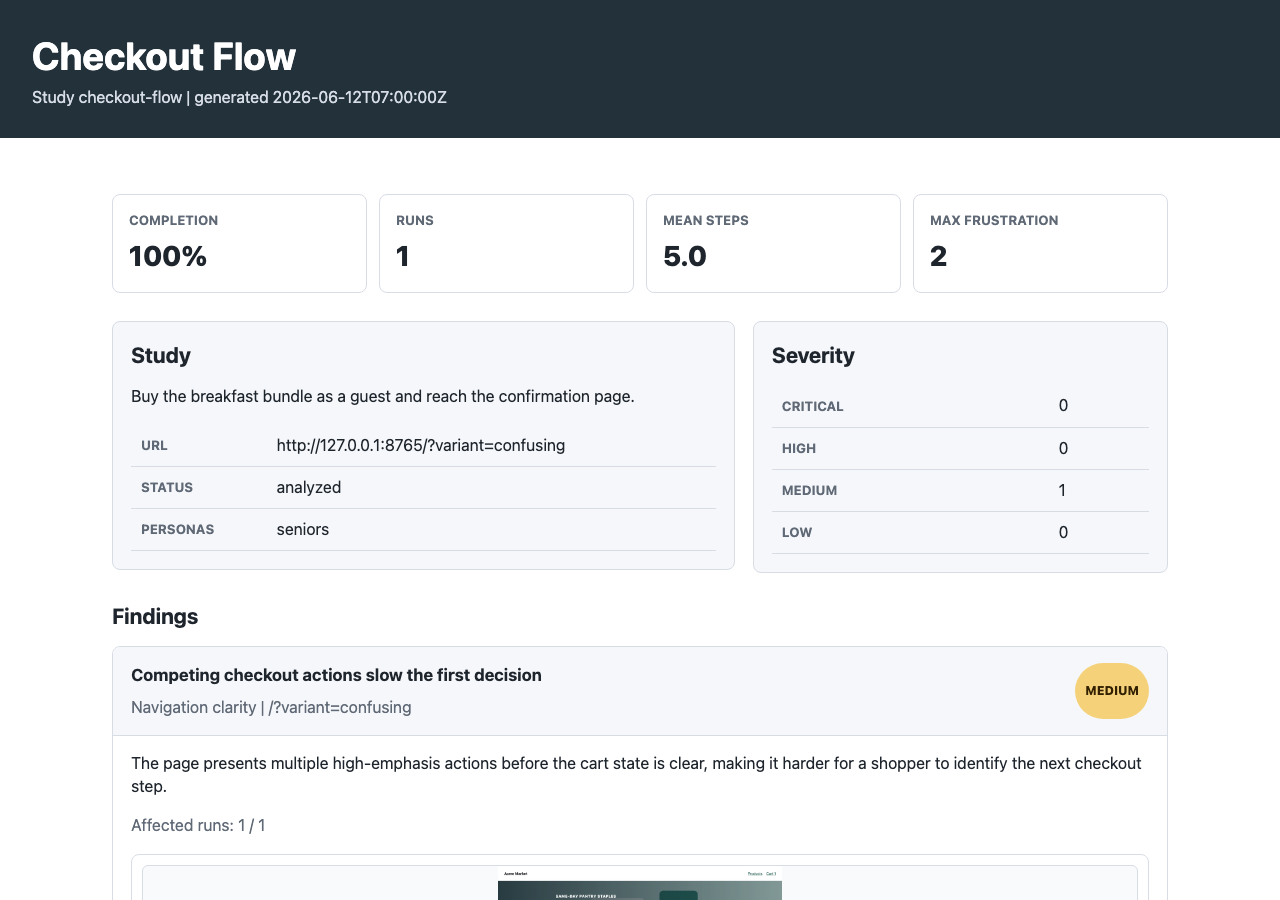
report.html evidence view looks like. It organizes package outputs for inspection. A coding agent follows the report handoff later to interpret this evidence and author the actual narrative.What to look for. Start with whether the clear and flawed variants ended differently. Then check how many runs support each finding and whether any run was unresolved or low quality. Finally, follow a finding back to its screenshot and trace. The severity badge is an analysis judgment; the linked run is the evidence you should trust.
Repeat with real EDSL persona decisions
What we are doing and why. The deterministic run showed that the experiment works and that known defects are observable. We now replace the fixed action path with synthetic visitors that interpret the task and page for themselves. This is the exploratory part of uxtest.
uxtest fixture register . --name northstar-edsl \
  --plan regression-edsl.yaml
uxtest fixture validate northstar-edsl
fixture register reuses the directory already copied in step 2 but selects its second plan, regression-edsl.yaml. The stable registered name is northstar-edsl, so the subsequent validate and run commands do not need the YAML path. Validation reads the plan only; it does not launch EDSL.
uxtest fixture run northstar-edslNo captured output is shown for this command. Unlike the scripted run, it launches billable remote EDSL decisions—up to 36 jobs for this fixture. Its output will use the same artifact-path format shown above, with three run directories per variant. Run it only when credentials, budget, and intent are in place.
This version changes the driver from scripted to edsl, uses three personas—mobile-first, low-confidence, and price-sensitive—and permits two concurrent runs. The site, device, task family, variants, and maximum steps remain controlled, so the main new variable is synthetic visitor judgment.
uxtest trace <edsl-study-id> --edsl-jobs
uxtest show <edsl-study-id> <run-id> --trace
As before, obtain <edsl-study-id> from the structured study list response. The first command returns the EDSL job metadata recorded at each step. It also reveals the run ids; use one of those in the second command to retrieve the complete browser-and-model record. Default output is already JSON, so no --json flag is required.
These commands cannot have authentic output until the preceding EDSL fixture has actually run. A scripted trace correctly returns No EDSL jobs found in traces.; presenting remote job URLs here without launching them would be fabricated.
The trace records the remote job UUID, model, progress/results URLs, structured decision, and browser outcome. With three personas × two variants × up to six steps, budget for as many as 36 remote decision jobs.
This follows the same evidence rule as the image review: model output is not detached prose. Every EDSL decision is stored beside the screenshot and browser outcome that produced the next state. The difference is frequency: the Acme image job evaluated one completed capture, while the multi-step driver asks EDSL for the next action at each state and records the resulting sequence.
What to learn from the new runs. Look for convergence and disagreement. Do different personas independently form the same expectation about a label? Does only the low-confidence persona stop early? Does a price-sensitive visitor seek pricing before product details? These are candidate hypotheses about the experience. Persona differences are not measurements of real demographic groups.
Hand evidence to the report-writing agent
What we are doing and why. The final step translates browser evidence into a decision aid. A useful report explains the research question, observed paths, strength and limits of the evidence, and the next validation step. It does not simply repeat every metric the package generated.
uxtest docs show report-writer-agentThe guide is longer than this excerpt; the command prints the complete packaged Markdown document.
uxtest report guide 2026-07-22-northstar-saas-fixture-flawed
uxtest report template 2026-07-22-northstar-saas-fixture-flawedThis is an excerpt from the actual response: the complete envelope also lists scores, findings, the evidence dashboard, log, image review, run metadata, recommended sections, and writing rules. The following template response contains a study-specific Markdown scaffold and writes no file.
The CLI supplies evidence, availability checks, structure, and writing rules. The coding agent inspects those sources and writes the final narrative—normally writeup/report.md—with its own judgment and traceable claims.
For a report spanning both variants, give the report-writing agent both study handoffs and the generated comparison path. The agent should reconcile the evidence and write one narrative; no additional package-generated narrative is needed. What good reporting sounds like: “Two browser-agent runs followed the product-learning CTA into login; test CTA copy that names the destination and lets visitors inspect the product before authentication.”
6. Optional follow-up questions
The core study is complete after comparison and evidence handoff. The commands below are not a required checklist. Each answers a different follow-up question using the same evidence. Choose one only when that question matters.
Watch the journey instead of reading JSON
uxtest animate 2026-07-22-northstar-saas-fixture-flawed --delay 250 --max-width 520Open analysis/animations/index.html. Use the GIF to understand page transitions quickly; return to the trace for exact claims because an animation omits structured action and outcome metadata.
Turn decisive screenshots into a human survey
uxtest humanize-export <edsl-study-id> \
  --template task-discovery \
  --screenshots representative --max-screenshots 8 \
  --output ./humanize/jobs.ep
ep inspect ./humanize/jobs.ep
ep humanize create \
  --jobs ./humanize/jobs.ep \
  --scenario_method ordered \
--schema ./humanize/humanize_schema.jsonThe first object is the actual exporter response: the agent chooses ./humanize/jobs.ep, and uxtest returns the resolved companion paths and exact next commands. The second object is the actual ep inspect response. The model-free Jobs package contains four questions and two screenshot scenarios. Inspecting it is local. Creating the survey is the explicit remote step.
cca59ab1-e3a3-4f00-895f-93d2cda57058.Current EDSL CLI issue: the pinned CLI simultaneously requires and rejects --scenario_method for a Jobs package containing scenarios. This survey was created through the equivalent EDSL API call after the CLI exposed that validation error. The documented CLI command is the intended interface, but it needs that upstream guard corrected before it succeeds.
Interview the completed trace agents
uxtest agents export <edsl-study-id>
uxtest interview <edsl-study-id> \
  --question "What did you expect Get started to do?" \
  --question "What evidence was missing before you could choose a product?"
python uxtest_store/studies/<edsl-study-id>/analysis/agent_interview.pyThis output was captured using the scripted study id in place of <edsl-study-id>. Each exported EDSL Agent contains its persona, journey, visible text, actions, reasoning, frustration, outcome, and screenshot FileStores. The generated interview script defaults to a dry run; --launch begins inference.
Add real saliency evidence
export UXTEST_SUM_DIR=/path/to/SUM
uxtest saliency run <edsl-study-id> --sum \
  --screenshots representative --max-screenshots 12
No captured output is shown. This feature requires a user-supplied SUM checkout or another real external model. When configured, the command prints the generated analysis/saliency/index.html path; without one, uxtest fails rather than inventing saliency.
See how expected flaws become a gate
uxtest eval <flawed-study-id> --expect expected_flaws.yaml \
  --variant flawed --policy threshold --minimum-recovered-expected 1
uxtest eval <clear-study-id> --expect expected_flaws.yaml \
--variant clear --policy strictThe displayed output is the captured flawed-study invocation; the clear invocation writes the corresponding two paths beneath the clear study. The flawed run should recover at least one known issue; the clear run should satisfy its positive first-click check and avoid flaws marked absent_in: clear. Use report_only for exploratory live sites where model variability should not fail CI.
7. Mental model
A study is the durable research request: the target, task, personas, and success criteria. A run is one persona attempting that request on one configured device or variant. A trace records the individual observations, decisions, actions, browser outcomes, and screenshots from that attempt. Analysis combines those events into scores and findings. Reports present the analysis for review.
This distinction matters because the layers have different evidentiary weight. Reports are convenient but derived; they can be regenerated or improved. Raw traces are the event-level source of truth. When a finding seems surprising, inspect the run that produced it rather than reasoning from the report alone.
| Layer | What it answers | Agent rule |
|---|---|---|
| Study | What task, target, personas, and success criteria? | Make the task behavioral and the criteria observable. |
| Run | What happened for one persona/device combination? | Do not silently discard interrupted or awkward runs. |
| Trace | What was visible, decided, attempted, and changed? | Return here whenever a summary looks surprising. |
| Analysis | What patterns and quality signals recur? | Treat it as derived, not canonical. |
| Evidence views | What patterns should the report-writing agent investigate? | Use them to navigate; verify claims against traces. |
8. Choose the smallest study
Start with the user’s decision, not a favorite command. Read the matching packaged guide before inventing a protocol: uxtest docs show <guide>.
Task discovery
What is this page? What gets the first click? Where does confidence break?
Content comprehension
Can visitors explain the offer, audience, claims, proof, and next step?
Conversion path
Can a visitor reach demo, signup, pricing, checkout, contact, or a gated asset?
Information architecture
Where do visitors expect docs, security, pricing, examples, APIs, or support?
Feature findability
Can a visitor verify a feature, integration, API, workflow, or permission model?
Enterprise research
Can buyers, operators, technical evaluators, and risk reviewers find enough evidence?
Onboarding or post-login
Can a new or authenticated user complete a meaningful role-specific workflow?
Benchmark or regression
Compare competitors, variants, releases, devices, or before/after designs.
uxtest docs list
uxtest docs show task-discovery
uxtest docs show conversion-path-testing
uxtest docs show accessibility-inclusive-uxdocs list produced the filenames above; each docs show command then printed the corresponding full Markdown guide. The headings are shown here rather than repeating three long guides inside this guide.
9. Fixture anatomy
Fixtures are the quickest repeatable path. Inspect with examples path; copy before editing or treating one as a project artifact; run with ci.
uxtest examples list
uxtest examples path expectedparrot-task-discovery
uxtest examples copy ./task-discovery.yaml \
  --name expectedparrot-task-discovery
uxtest ci ./task-discovery.yamlThe first three groups are captured output with machine-specific roots shortened. The final artifact names vary with the fixture id, date, and run suffix; the complete unshortened Northstar fixture output earlier shows the exact format.
A fixture can define personas, variants, devices, analysis, evaluation, reporting, and run retention together. Keep max_concurrent_runs low on public sites to avoid request bursts from one IP.
A useful live-site shape
id: my-site-discovery
name: My Site Discovery
mode: live-site
url_template: https://example.com/
task: >
  Starting from the homepage, decide whether this product is relevant.
  Find the most useful next item and explain what you would do next.
success_criteria: >
  The visitor identifies relevant evidence and a concrete next action.
personas: [academic-researcher]
runs_per_persona: 1
driver: edsl
max_steps: 8
max_concurrent_runs: 2
analysis_driver: local
eval_policy: report_only
variants:
  - {name: desktop, device: desktop}
  - {name: mobile, device: iphone}
10. Create a one-off study
Use a one-off study when no fixture matches. A good task gives the persona a goal and context but does not prescribe the clicks. Success criteria should describe visible evidence, not a preferred interpretation.
uxtest study new "Homepage discovery" \
  --url "https://example.com/" \
  --task "Decide whether this product fits your research workflow." \
  --success-criteria "The visitor identifies evidence and a next action." \
  --persona academic-researcher \
  --runs-per-persona 1

uxtest study run <study-id> --driver edsl \
  --max-steps 8 --max-concurrent-runs 2
uxtest analyze <study-id> --include-interrupted
uxtest animate <study-id>
uxtest uxr <study-id>Only the first line was captured from this exact one-off command. The remaining commands require replacing <study-id> and performing browser inference; their displayed paths document the command contract rather than claiming an unperformed run.
Use --driver edsl for synthetic decisions, heuristic for deterministic local behavior, and scripted for fixture-defined paths. Built-in devices are desktop, iphone, and pixel.
11. Authenticated flows
Make sign-in deterministic with setup_steps, then let EDSL take over for the actual research task. Secrets come from environment variables; sensitive typed values are redacted.
env_file: secrets.env
auth_state:
  save: uxtest_store/auth/test-user.json
setup_steps:
  - {type: click, label: Log in}
  - {type: type, name: email, env: TEST_USER_EMAIL, sensitive: true}
  - {type: type, name: password, env: TEST_USER_PASSWORD, sensitive: true}
  - {type: click, label: Continue}
Later studies can use auth_state: {load: uxtest_store/auth/test-user.json}. Use staging accounts, static test OTPs, or a test bypass—never real user credentials. CAPTCHA and live MFA require a bypass or manual hook.
12. Inspect evidence in order
Begin broad, then drill down. Comparison and technical evidence views expose patterns; log.html shows the full step mechanics; raw traces settle ambiguity. These artifacts inform the report-writing agent but do not replace its judgment.
- Comparison:
uxtest_store/comparisons/<name>.html - Evidence views:
analysis/report.htmlandanalysis/uxr_report.html - Step debugger:
analysis/log.html - Structured summaries:
findings.jsonandscores.json - Ground truth: run
trace.jsonl, metadata, and screenshots
uxtest show <study-id> --json
uxtest show <study-id> <run-id> --trace --json
uxtest trace <study-id>
uxtest trace <study-id> --edsl-jobsshow --json, show --trace --json, and trace are displayed in steps 5 and 6 above.
For this scripted run, the final command prints:
No EDSL jobs found in traces.log.html is for debugging: it joins persona, scenario, screenshot, EDSL prompt, remote job, model response, attempted action, and browser result. Never infer a browser defect from model prose alone; check what the browser actually recorded.
13. Read actions and endings correctly
A click that stays on the same URL is not automatically a failure. Use action_outcome to distinguish navigation, a menu opening, an in-page state change, a scroll, a new tab, or no visible change.
| Signal | Interpretation |
|---|---|
| url_navigation / new_tab | The action advanced to another document or context. |
| menu_opened | A useful state change may have occurred without navigation. |
| same_page_state_change | The page responded; inspect the before/after screenshots. |
| no_visible_change | Candidate friction, an ineffective action, or an instrumentation gap. |
Use stop_quality to separate a resolved run from an agent that continued too long, looped, hit authentication, or never visibly advanced.
| Stop quality | How to use it |
|---|---|
| done | The run reached a defensible resolution. |
| enough_evidence_but_continued | Evidence may be useful; extra steps should not become extra friction findings. |
| looping | Inspect repeated actions before attributing the loop to the interface. |
| blocked_by_auth | Usually a study/setup limitation unless authentication is the task. |
| blocked_by_no_visible_advance | Inspect action outcomes and screenshots for candidate interaction failure. |
| unresolved / error | Preserve and disclose; do not count as ordinary success or failure. |
14. Hand evidence to the report writer
Read the packaged writing guide before composing a stakeholder narrative. It defines evidence extraction, citation style, role boundaries, and the quality bar.
uxtest docs show report-writer-agent
uxtest report guide 2026-07-22-northstar-saas-fixture-flawed
uxtest report template 2026-07-22-northstar-saas-fixture-flawedThe package inventories and structures the evidence. The calling coding agent owns the final report.
What the trace shows
“Three desktop runs opened Resources before locating API evidence.”
What it may mean
“This pattern suggests the API path may not match evaluators’ expectations.”
What to test next
“Test an explicit API link with human technical evaluators.”
What was measured
State the personas, tasks, variants, devices, and number of runs so readers can interpret the result.
- Cite the run, step, screenshot, or artifact behind important claims.
- Separate UX friction from trace-quality and agent-behavior problems.
- Include interrupted, blocked, and unresolved runs in limitations.
- Describe personas and devices; do not imply demographic representativeness.
- Recommend validation proportional to the decision’s stakes.
15. Advanced workflows
Figma studies
Use uxtest figma doctor, then import frames, generate a vision study, audit a prototype, or write an import report.
Screenshot surveys
humanize-export turns selected trace screenshots into a model-free Jobs package for ep humanize. It does not record human browsing.
Saliency overlays
saliency run requires a real external saliency engine. uxtest will not fabricate maps.
Rich trace agents
agents export materializes one EDSL Agent per run; interview asks follow-up questions of those evidence-rich agents.
# Human validation artifact (dry-run by default)
uxtest humanize-export <study-id> --template task-discovery \
  --screenshots representative --max-screenshots 8 \
  --output ./humanize/jobs.ep

# Inspect locally, then explicitly create the remote human survey
ep inspect ./humanize/jobs.ep
ep humanize create \
  --jobs ./humanize/jobs.ep \
  --scenario_method ordered \
  --schema ./humanize/humanize_schema.json

# Reusable EDSL agents from completed traces
uxtest agents export <study-id>
uxtest interview <study-id> \
--question "What evidence shaped your decision?"The humanize Jobs package and generated interview scripts are safe to inspect first. Human-survey creation begins only with ep humanize create; interview inference begins only with its explicit --launch option. A run with four personas, two variants, and eight steps can create up to 64 remote decision jobs, so plan cost and latency before scaling.
16. Regression and CI
Use deterministic fixtures and explicit expected flaws for stable regression checks. Use EDSL studies when you want visitors to interpret the page and choose their own paths.
uxtest eval <study-id> --expect expected_flaws.yaml \
  --policy threshold --minimum-recovered-expected 2
uxtest ci fixture-a.yaml fixture-b.yamlThe evaluation paths are captured verbatim. CI prints every generated run, analysis, evaluation, animation, and comparison path; the complete unabridged example appears under “Run both variants with one command.”
| Policy | Best use |
|---|---|
strict | Deterministic local fixtures whose expected behavior is controlled. |
threshold | Allow a defined recovery floor when some variation is acceptable. |
report_only | Live-site and exploratory research where evidence matters more than gating. |
Generated evidence views are disposable. If analysis or rendering changes, regenerate them from retained traces instead of editing generated HTML by hand.
17. Debugging ladder
- Run
uxtest doctor. - Check
uxtest statusand the study/run metadata. - Open or inspect
log.html. - Compare the EDSL decision with the browser
action_outcome. - Inspect before/after screenshots and raw trace events.
- Check
stop_qualitybefore labeling a run successful or failed. - Verify remote job metadata with
uxtest trace <id> --edsl-jobs.
rg -n '"outcome"|"action_recovery"|"gave_up"|"max_steps"' \
  uxtest_store/studies/<study-id>
rg -n '"action_outcome"|"no_visible_change"|"menu_opened"' \
  uxtest_store/studies/<study-id>
rg -n '"stop_signal"|"stop_quality"|"blocked_by_auth"' \
uxtest_store/studies/<study-id>These lines are from the captured Northstar run. The two no_visible_change events and the final stop-quality classification explain why a raw max_steps outcome needs interpretation rather than being treated as simple task failure.
18. Agent handoff checklist
- The study type matches the decision being tested.
- The task is goal-based and the success criteria are observable.
- Personas and devices cover the important contrasts.
- Concurrency is appropriate for the target site.
- Secrets use test accounts and are redacted.
- Raw traces and screenshots are retained as source evidence.
- Action outcomes and stop quality were checked.
- Findings cite the runs that produced them.
- Failed runs and instrumentation gaps are recorded.
- The next design or testing step is concrete.
uxtest to make UX hypotheses faster, more inspectable, and more reproducible. Let evidence—not fluent model narration—carry the conclusion.