Morphological Analysis
From structured possibility spaces and cross-consistency logic to parallel digital-twin scoring, Pareto frontiers, and adaptive Bayesian search.
01 Orientation
General Morphological Analysis (GMA) explores problems whose important choices are discrete, interdependent, and not adequately represented by one smooth equation. A product, service, policy, or architecture is decomposed into dimensions; a complete configuration chooses exactly one value from every dimension.
The method deliberately separates possibility, preference, evidence, and decision:
Possibility
What choices exist, and which combinations are internally coherent?
Preference
Which coherent combinations perform well for stakeholders and criteria?
Evidence
Which configurations should be assessed first when evaluation is costly?
Decision
Which tradeoffs and portfolio of concepts should move forward?
02 The morphological box
Let dimension i have a finite value set Vi with size mi. Before consistency constraints, the configuration count is the Cartesian product:
Four dimensions with three values each produce 34=81 configurations. Ten dimensions with five values each produce 510=9,765,625. Combinatorial growth is the phenomenon the method makes visible.
| Good dimension | Values | Why it belongs |
|---|---|---|
| Delivery channel | mobile, web, assisted | Each is a mutually exclusive design choice. |
| Pricing model | subscription, usage, bundled | Changes the commercial architecture. |
| Trust mechanism | human review, audit log, guarantee | Exposes a consequential hidden assumption. |
| Not: desirability | low, medium, high | Desirability evaluates configurations; it is not part of their morphology. |
zwicky init hot-dog --problem "Design a differentiated hot-dog menu concept"

zwicky -C hot-dog dim add "Bun" --values "Classic,Pretzel,Gluten free"
zwicky -C hot-dog dim add "Sausage" --values "Beef,Chicken,Veggie"
zwicky -C hot-dog dim add "Topping" --values "Onions,Chili,Slaw"
zwicky -C hot-dog dim add "Service style" \
--values "Street cart,Fast casual,Premium plated"zwicky -C <project> guide early and repeatedly. It returns the phase, quality checks, interaction rules, and next command.03 Cross-consistency assessment
Cross-consistency assessment (CCA) judges pairs of values from different dimensions. OK records coherence, tension records a possible but risky pairing, and incompatible removes every configuration containing a hard contradiction.
With four three-valued dimensions, P=6×9=54 cells. Same-dimension pairs are irrelevant because a configuration never selects two values from one dimension.
How names become command IDs
Zwicky generates stable IDs when dimensions and values are added. It lowercases the visible name, replaces each run of non-alphanumeric characters with a hyphen, and removes leading or trailing hyphens. A value’s full ID is its dimension ID, a period, and its value slug:
| Visible dimension | Dimension ID | Visible value | Full value ID |
|---|---|---|---|
| Bun | bun | Gluten free | bun.gluten-free |
| Sausage | sausage | Veggie | sausage.veggie |
| Topping | topping | Chili | topping.chili |
| Service style | service-style | Street cart | service-style.street-cart |
Use dim list to discover the stored names and IDs. A bare value name such as Veggie also works when it is unambiguous, but full IDs are safer in scripts and audit trails.
zwicky -C hot-dog dim list

# Full IDs are explicit and stable:
sausage.veggie
topping.chili
bun.gluten-free
service-style.street-cart
zwicky -C hot-dog cca set sausage.veggie topping.chili \
--verdict incompatible --reason "The house chili contains beef."
zwicky -C hot-dog cca set bun.gluten-free service-style.street-cart \
--verdict tension --reason "Separate handling is difficult in a compact cart."
zwicky -C hot-dog cca gaps
zwicky -C hot-dog cca plot --output writeup/cca.svg --mode assessmentReserve incompatible for combinations that cannot coherently coexist. Costly, unusual, or difficult pairs belong under tension or later preference scoring.
04 Feasible configurations
Zwicky can materialize F with early pruning: as soon as a partial configuration contains an incompatible pair, its remaining branch is abandoned. Materialization means constructing the surviving records in memory and writing them to .zwicky/configs.jsonl.
zwicky -C hot-dog config generate
# Optional lower ceiling; the hard ceiling is always 100,000:
zwicky -C hot-dog config generate --max-configs 10000

zwicky -C hot-dog config stats
zwicky -C hot-dog config list --human
In the hot-dog box, Veggie with beef-containing Chili eliminates every combination containing both. The other two dimensions remain free:
With overlapping incompatible pairs, subtraction is not generally additive. Enumeration with pruning is safer than informal inclusion–exclusion.
05 Representing complete configurations
A configuration begins as a list of morphological value IDs, but evaluators need a stable presentation of the complete option. Build that presentation once and reuse it across rating jobs, pairwise comparisons, human surveys, and reports. Otherwise wording or imagery can change between evaluations and become an unrecorded experimental variable.
Canonical descriptions and writeups
Keep a compact factual description for survey presentation and a richer writeup for interpretation. Both should be derived from the same configuration record:
Evaluation description
Pretzel bun · Chicken sausage · Slaw · Premium plated
Price: $8
Short, parallel, and suitable for repeated scoring.
Concept writeup
Plated pretzel chicken dog
A chicken sausage served in a pretzel bun with slaw in a premium plated format. The concept combines an approachable protein with a substantial bun and restaurant-style presentation.
Use the short description when the task is to compare attributes. Use the writeup when evaluators need context such as use occasion, service assumptions, implementation details, or a concept name. Store the configuration ID alongside both so evidence can always be joined back to the morphological box.
EDSL can generate the fuller writeups in parallel from the same configuration ScenarioList. Ask for factual synthesis rather than a score, and keep the requested fields stable:
from edsl import QuestionFreeText, Survey

writeup = QuestionFreeText(
    question_name="concept_writeup",
    question_text="""Write a concise concept card for this configuration.

Configuration ID: {{ scenario.config_id }}
Values: {{ scenario.description }}

Return a short concept name followed by two factual sentences describing
the complete offering, intended occasion, and service format. Do not rate it.""",
)

writeup_results = Survey([writeup]).by(configuration_scenarios).run()
writeup_results.git.save("hot-dog/option-writeups.ep")
Ingest the returned text into Zwicky’s presentation registry. The run remains keyed by configuration ID and preserves the source Results package:
zwicky -C hot-dog presentations ingest \
  --results hot-dog/option-writeups.ep \
  --name "Hot-dog concept writeups"

zwicky -C hot-dog presentations list
zwicky -C hot-dog presentations show <presentation-run-id>
Use the stored text in a real evaluation by passing its run ID. Zwicky checks that the run covers every selected configuration and then places the saved title, description, and writeup into each assessment Scenario:
zwicky -C hot-dog utility build \
  --sample <sample-id> \
  --presentation <presentation-run-id>

zwicky -C hot-dog preference build <preference-design-id> \
  --presentation <presentation-run-id>
The generated writeup is now reusable presentation material, not evaluation evidence itself. Ratings and choices collected after it is attached are the evidence.
Generate one image per option
When appearance matters, create one canonical image for each configuration and reuse it wherever that option appears. The prompt should hold camera, scale, background, lighting, and exclusions constant while substituting only the configuration description:
from edsl import QuestionImageGeneration

make_image = QuestionImageGeneration(
    question_name="configuration_image",
    question_text=(
        "Create a consistent studio product photograph of this hot dog: "
        "{{ scenario.description }}. Neutral background, identical camera "
        "angle and scale; no text, labels, prices, logos, hands, or people."
    ),
)

image_results = make_image.by(configuration_scenarios).run()
image_results.git.save("hot-dog/option-images.ep")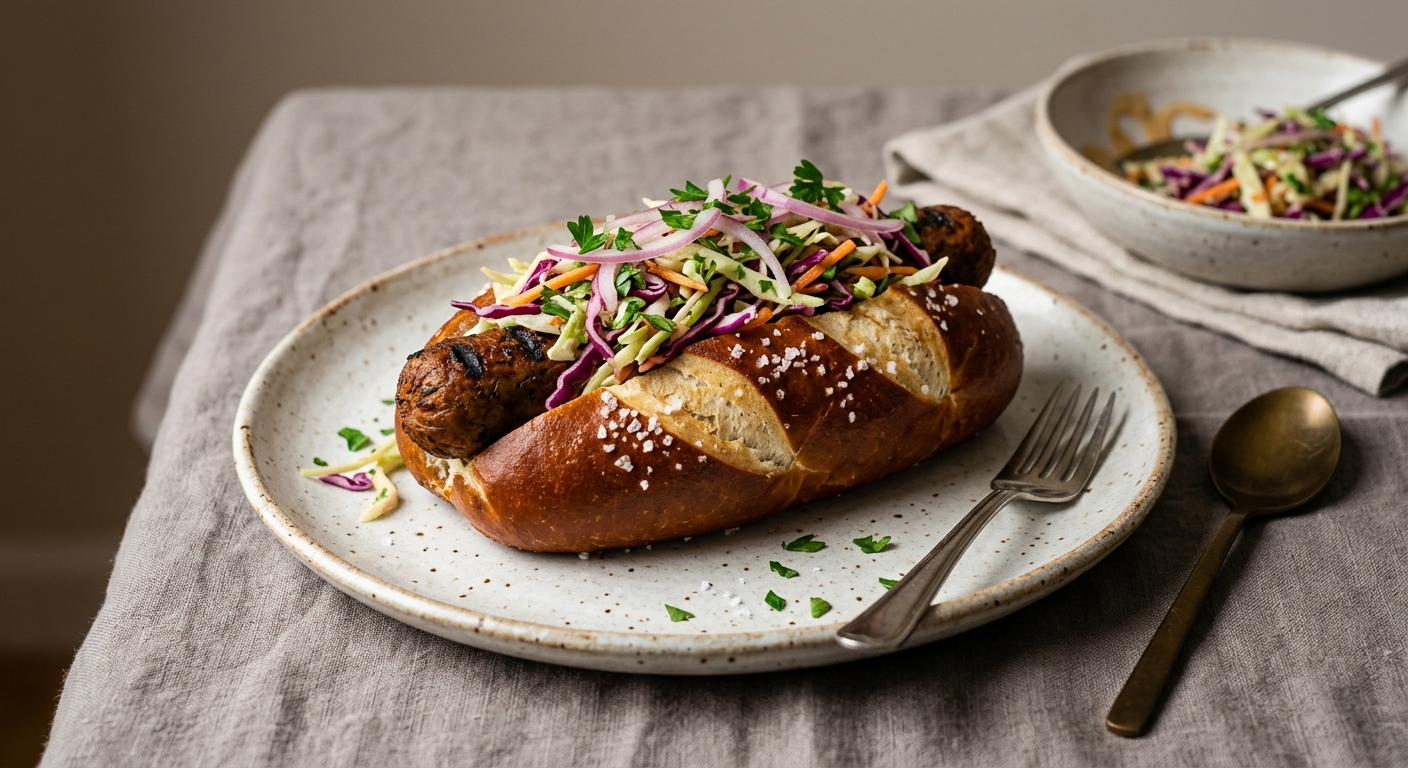
Pretzel · Veggie · Slaw · Premium plated
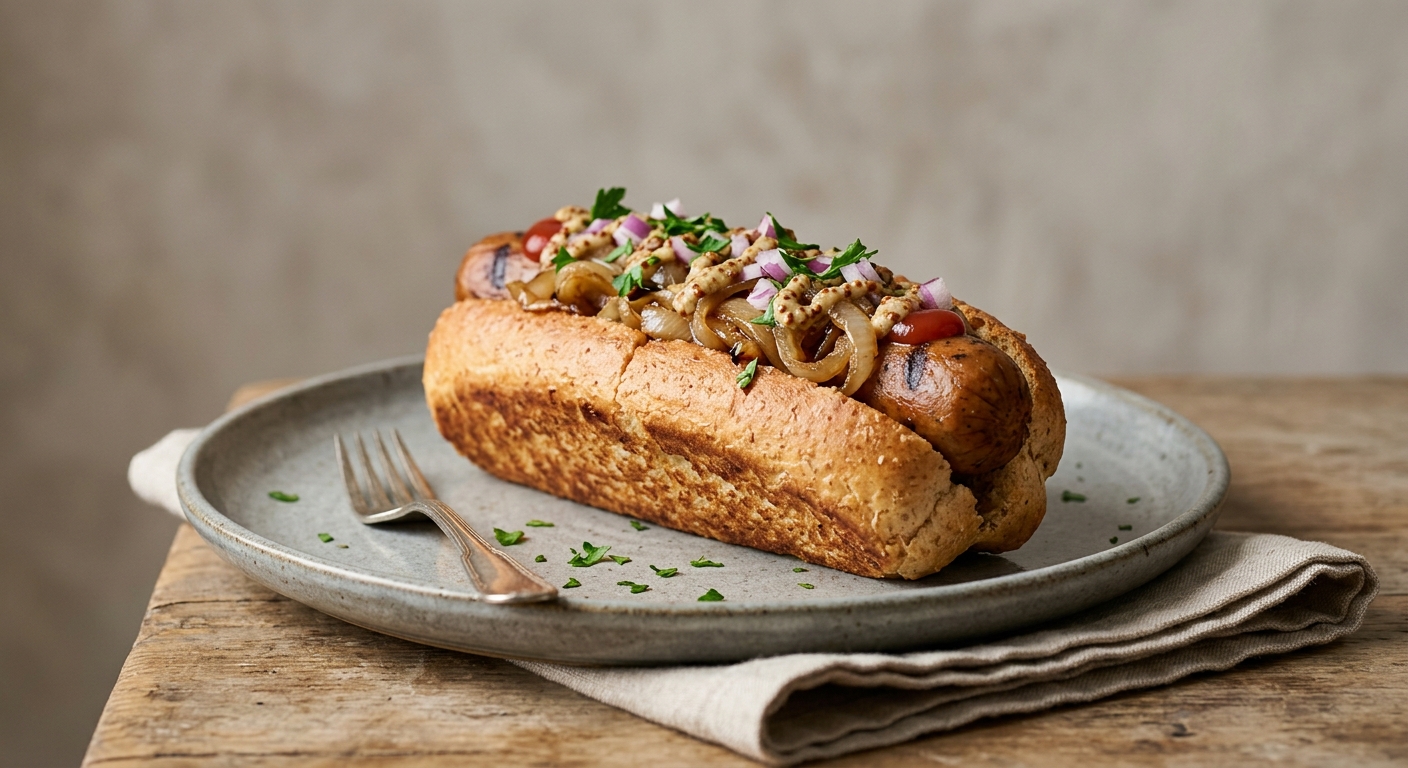
Gluten free · Veggie · Onions · Premium plated
Register generated assets with Zwicky
zwicky -C hot-dog images ingest \
  --results hot-dog/option-images.ep \
  --name "Hot-dog option renders"

zwicky -C hot-dog images list
zwicky -C hot-dog images show <image-run-id>
zwicky -C hot-dog images export <image-run-id>
Zwicky stores unique image bytes by SHA-256 hash, indexes their configuration mappings, and preserves the original EDSL Results package and run manifest. The registry is canonical; images export creates a self-contained EDSL ScenarioList.ep only when an evaluation job needs one.
06 Sampling designs
If every feasible configuration can be scored cheaply, exhaustive evaluation is clearest. Sampling matters when configurations, twins, criteria, rationales, or model calls make exhaustive scoring expensive.
A sampling design is a rule for deciding which configurations receive the evaluation budget. This chapter covers three ways to construct an initial batch before scores exist. Bayesian follow-up sampling begins only after results exist and is developed separately in Chapters 13–15.
| Method | Optimizes | Use when | Main sacrifice |
|---|---|---|---|
| random | Unbiased reproducibility | You need a simple baseline. | May miss rare values or pairs. |
| coverage | Value-pair representation | You need an intuitive breadth guarantee. | Not optimized for model estimation. |
| d-optimal | Separating the effects in a chosen model | You intend to fit main or pairwise effects. | Depends on the model you specify. |
Run the three designs
1. Random: draw a neutral baseline
Random sampling gives every feasible configuration the same chance of selection. The seed makes the draw reproducible. For the 72 feasible hot dogs, request 12 concepts:
zwicky -C hot-dog sample create \
  --method random --size 12 --seed 123 --human
The command returns the immutable sample ID, selected configurations, and diagnostics. The abridged output from the worked example is:
id: sample-72e01dc5
method: random
size: 12
seed: 123
theoretical_count: 81
attempts: 14
accepted: 12
acceptance_rate: 0.857143
The sampler drew 14 distinct Cartesian indices, rejected two infeasible combinations, and retained 12. It did not optimize which values or pairs appeared.
2. Coverage: spend the batch on breadth
Coverage sampling first draws a feasible candidate pool, then greedily selects the configuration that adds the most previously unseen values and cross-dimension value pairs. For this small example, a pool of 72 exposes the full feasible space:
zwicky -C hot-dog sample create \
  --method coverage --size 12 \
  --candidate-pool 72 --seed 123 --human
id: sample-575bfdf9
method: coverage
size: 12
candidate_count: 72
values_covered: 12 of 12
pairs_covered: 53 of 53
pair_coverage: 1.0
attempts: 81
accepted: 72Twelve selected hot dogs exercise every individual value and every feasible cross-dimension pair visible in the 72-concept pool. Repeating a covered pair provides no additional coverage gain, so the method favors breadth early.
3. D-optimal: choose informative contrasts
D-optimal sampling chooses configurations that help distinguish the coefficients in a named feature model. If Veggie always appears with Gluten-free, their effects are confounded; the design instead varies them independently across the batch. Here the initial model contains main effects only:
zwicky -C hot-dog sample create \
  --method d-optimal --features main-effects \
  --candidate-pool 72 --prior-precision 1 \
  --size 12 --seed 123 --human
Id: sample-360be9d3
Method: d-optimal
Feature Model: main-effects
Size: 12
feature count: 13
estimable rank: 9
rows per feature: 0.9231
regularized log determinant gain: 15.7103
values covered: 12 of 12
pairs covered: 53 of 53The design selected 12 rows for a 13-feature categorical encoding. The feasible box has estimable rank 9 because one value is selected from every dimension and some columns are linearly dependent. Prior precision 1 regularizes those dependencies.
Put the feature row for each selected configuration into a matrix X. D-optimal design chooses rows that maximize the volume of the regularized information matrix:
A larger determinant means the selected rows provide broader, less redundant contrasts for the specified feature model. Zwicky builds the batch greedily, adding the candidate with the largest incremental information gain:
This is an initial-design calculation: it uses configuration features, not observed outcome scores. The --features choice determines what the design is trying to estimate, and α is set by --prior-precision.
The hot-dog box under each design
Each panel below contains the same 81 positions: nine Bun × Sausage groups, each containing the nine Topping × Service-style combinations. The nine white slashed cells are Veggie + Chili combinations removed by cross-consistency analysis. The remaining 72 gray cells are feasible; green cells are the 12 configurations returned by the command above. Hover over any cell for its complete configuration.
The visual difference is the design decision. Random preserves a probability sample. Coverage deliberately spreads selections across the box. D-optimal chooses contrasts that support the specified feature model. In this small balanced example, both optimized designs achieve complete feasible pair coverage; in larger boxes their objectives can lead to different trade-offs.
Sampling without enumerating
Zwicky treats the Cartesian space as a mixed-radix index. It draws an integer J uniformly from 0…|Ω|−1, decodes J into one value index per dimension, and rejects the draw if it contains an incompatible pair. Because the original Cartesian draw is uniform, conditioning on feasibility produces a uniform feasible draw:
Indices are not repeated, so accepted configurations are unique. The sampler reports attempts, acceptance rate, theoretical Cartesian count, exclusions, and whether the Cartesian space was exhausted. A sparse feasible region may require a larger attempt budget.
zwicky sample create --method random --size 40 --seed 123
zwicky sample create --method coverage --size 40 \
  --candidate-pool 2000 --max-attempts 200000 --seed 123
zwicky sample create --method d-optimal \
  --features main-plus-pairwise --candidate-pool 10000 \
  --size 100 --seed 123
zwicky sample stats sample-123 --human
Random sampling selects directly from accepted implicit draws. Coverage and D-optimal methods first draw a bounded feasible candidate pool and then optimize within that pool. Their result is therefore conditional on the pool; increasing --candidate-pool improves search breadth while increasing time and memory.
The choice between exhaustive scoring and sampling depends on evaluation cost. When ten thousand scores are inexpensive, exhaustive evaluation may be simpler; higher per-configuration costs make sampling more valuable.
07 Parallel digital-twin scoring
After defining and sampling the feasible design space, we still need evidence about which complete configurations may work well. In this workflow, we ask AI-generated synthetic personas to evaluate them. Each persona is instructed to answer from a specified stakeholder perspective—for example, a price-sensitive customer, a street-cart operator, or a traditional hot-dog buyer. We call these simulated evaluators digital twins.
What Expected Parrot and EDSL do
Expected Parrot develops tools for research with AI agents and human respondents. Its open-source Expected Parrot Domain-Specific Language (EDSL) is a Python framework for defining questions, surveys, personas, language models, scenarios, and reproducible results. Zwicky designs the morphological assessment; EDSL turns that design into executable AI interviews.
| EDSL object | Meaning in this tutorial | Hot-dog example |
|---|---|---|
| Agent | One synthetic respondent. Its traits or persona tell the language model whose perspective to simulate. | “A budget-conscious commuter buying lunch from a street cart.” |
| AgentList | A collection of agents evaluated together. It may be created from Zwicky stakeholders or imported from an existing .ep package. | Twenty commuter personas plus ten food-service operator personas. |
| Scenario | The changing context inserted into otherwise identical questions. Zwicky makes each complete configuration a scenario. | Classic bun + Veggie sausage + Onions + Street cart. |
| Question | A typed prompt with a validated answer format, such as a 1–7 scale or free text. | Purchase intent on a seven-point scale. |
| Survey | The set of criterion and rationale questions asked for every scenario. | Purchase intent, novelty, complexity, and reasons. |
| Jobs package | The executable combination of a Survey, AgentList, ScenarioList, and language model settings. EDSL expands it into individual AI interviews. | All selected personas × all sampled hot dogs. |
| Results | The structured responses plus provenance such as agent, scenario, question, and model. | One persona’s scores and explanations for one hot dog. |
An .ep file is a saved EDSL artifact. It is not a prose prompt pasted into a chat window: it is a reusable package describing the agents, questions, scenarios, or executable jobs so the assessment can be inspected, run, saved, and analyzed consistently.
What question does an AI persona answer?
First define criteria with questions that a respondent can answer from the information shown. Zwicky inserts the complete configuration description beneath each criterion question. For example:
Question as presented for one interview
Stakeholder description: A budget-conscious commuter who buys quick weekday lunches.
Question: How likely would you be to purchase this configuration?
Configuration ID: config-a1b2c3d4
Values:
• Pretzel
• Veggie
• Slaw
• Street cart
Known tensions:
• No recorded tensions.
Answer: Select 1–7, where 1 is very low and 7 is very high.
Follow-up: Explain your Purchase intent rating. Name the main drivers and tradeoffs.
Zwicky represents that interview with ordinary EDSL objects. The following abbreviated Python shows the generated question text and object relationships:
from edsl import (
    Agent, AgentList, Jobs,
    QuestionFreeText, QuestionLinearScale,
    Scenario, ScenarioList, Survey,
)

agents = AgentList([
    Agent(
        name="budget-commuters",
        traits={
            "stakeholder_id": "budget-commuters",
            "stakeholder_name": "Budget commuters",
            "stakeholder_description": (
                "Budget-conscious commuters who buy quick weekday lunches."
            ),
            "stakeholder_kind": "customer segment",
        },
        instruction=(
            "You are evaluating product or feature configurations from "
            "the perspective of the stakeholder described in your traits."
        ),
    )
])

configurations = ScenarioList([
    Scenario({
        "config_id": "config-a1b2c3d4",
        "config_description": (
            "Configuration ID: config-a1b2c3d4\n\n"
            "Values:\n- Pretzel\n- Veggie\n- Slaw\n- Street cart\n\n"
            "Known tensions:\n- No recorded tensions."
        ),
    })
])

purchase_intent = QuestionLinearScale(
    question_name="purchase_intent",
    question_text=(
        "How likely would you be to purchase this configuration?\n\n"
        "{{ config_description }}"
    ),
    question_options=[1, 2, 3, 4, 5, 6, 7],
    option_labels={1: "very low", 7: "very high"},
    include_comment=True,
)

purchase_reason = QuestionFreeText(
    question_name="rationale_purchase_intent",
    question_text=(
        "Explain your Purchase intent rating. "
        "Name the main drivers and tradeoffs.\n\n"
        "{{ config_description }}"
    ),
)

survey = Survey(
    [purchase_intent, purchase_reason],
    name="zwicky_configuration_utility",
)

jobs = Jobs(
    survey=survey,
    agents=agents,
    scenarios=configurations,
)
The {{ config_description }} placeholder is filled from each Scenario at execution time. Adding scenarios repeats the same questions for every selected configuration; adding agents repeats them for every persona. The Jobs object is therefore the complete executable study design.
The persona, question wording, scale anchors, and configuration description define the evaluation context. “How likely would you be to purchase this for a weekday lunch at the stated price?” identifies a perspective, behavior, and occasion. Include price as a dimension or scenario field when the question refers to it.
Customizing the evaluation wording
The text supplied to criteria add --question is used verbatim as the primary valuation question. Zwicky supplies defaults for the shared agent instruction, rationale question, and scale endpoint labels. Each can be overridden when building the assessment:
zwicky -C hot-dog utility build \
  --sample sample-123 \
  --criteria purchase-intent \
  --instruction "Evaluate each concept as a weekday lunch purchase." \
  --rationale-question "What primarily explains your {criterion} score?" \
  --low-label "Definitely would not buy" \
  --high-label "Definitely would buy"
{criterion} expands to the criterion’s display name, so the example becomes “What primarily explains your Purchase intent score?” The configuration description is appended automatically. These resolved settings are saved in the assessment manifest and contribute to its ID; two assessments with different wording are separate artifacts.
How the scoring experiment is assembled
- Register perspectives. Add stakeholder descriptions or import a previously constructed EDSL AgentList. Several agents per segment can represent varied synthetic personas; repeating an identical vague persona is not equivalent to recruiting more people.
- Select configurations. Use all feasible configurations when affordable, or a random, coverage, D-optimal, or adaptive sample.
- Define criteria. Each criterion supplies a question, direction (maximize or minimize), and optional weight.
- Build artifacts. Zwicky writes the AgentList, ScenarioList, Survey, and one or more Jobs packages.
- Run AI interviews. EDSL sends the appropriate persona, question, and configuration to a language model and records the structured response.
- Ingest and analyze. Zwicky joins responses back to configuration and stakeholder IDs, checks completion, computes criterion summaries, and retains rationales and disagreement.
Evaluator assignment is criterion-specific. Consumer personas can answer purchase intent and novelty together, while a food-service expert answers operational cost once for each configuration. Zwicky groups criteria sharing an evaluator panel into one survey and returns a separate edsl run command for each panel.
zwicky -C hot-dog stakeholders add \
  --name "Traditionalists" \
  --description "Buyers who prefer familiar combinations and value." \
  --kind "digital twin segment"

zwicky -C hot-dog utility build \
  --all-configs \
  --criteria purchase-intent,operational-cost,novelty \
  --rationale none --batch-size 250
utility build does not call a language model. It creates the assessment packages and returns commands for running them. A batch size of 250 places at most 250 configuration scenarios in each independently runnable shard. Sharding makes large runs easier to parallelize, retry, and ingest incrementally; it does not change the questions or scoring logic.
The execution handoff: edsl run
The returned run_commands contain independently runnable shards:
edsl run jobs-0001.ep --output results-0001.ep
edsl run jobs-0002.ep --output results-0002.ep

zwicky utility ingest utility-123 \
  --results results-0001.ep results-0002.ep
zwicky utility analyze utility-123
edsl run is the execution step. The preceding Zwicky commands modify local project state and assemble the study. Running edsl run jobs-0001.ep loads the saved agents, scenarios, and survey; selects the configured or default language model; executes the AI interviews; and writes an EDSL Results package. This step requires the relevant EDSL/Expected Parrot or model-provider credentials and can consume inference credits or incur model-provider cost.The --output results-0001.ep argument gives the completed Results package an explicit path. Zwicky does not execute this command automatically: the person or calling agent running the study controls model selection, credentials, execution mode, retries, and timing. Once every shard has a result package, zwicky utility ingest imports them and zwicky utility analyze calculates the comparisons.
How ratings become comparisons
On a seven-point maximize criterion such as purchase intent, 1 means very low and 7 means very high. On a minimize criterion such as operational complexity, the response scale describes increasing complexity, so Zwicky reverses it for composite summaries: a raw 2 becomes an oriented 6. Raw scores remain available. Zwicky then reports means by configuration and stakeholder, disagreement, completion, value-level patterns, rationales, and—when several criteria are present—Pareto trade-offs.
The analysis includes the number and diversity of agents, completion rates, dispersion across personas, model and prompt provenance, and written rationales. Consistent questions and evaluation conditions make configurations directly comparable; replication helps characterize small score differences.
For a large first-pass screen use --rationale none to reduce token use and latency. Reassess a smaller set of finalists with --rationale all; the explanations can reveal missing assumptions, unexpected interactions, and reasons that an average score conceals.
08 Pairwise study design and price
Direct ratings ask each evaluator to place one configuration on a scale. A pairwise task instead presents two complete configurations at stated prices and asks which one the evaluator would choose. The comparison supplies a sharper behavioral contrast: choosing A means that A’s complete bundle is preferred to B’s complete bundle under the prices shown.
Use ratings for levels
“How operationally complex is this?” or “How likely are you to purchase this?” Ratings support absolute thresholds, criterion summaries, and Pareto analysis.
Use choices for trade-offs
“Which would you purchase?” Choices reveal whether one bun, sausage, topping, service style, or price compensates for another.
What an evaluator sees
- Pretzel bun
- Veggie sausage
- Slaw
- Fast casual
- Classic bun
- Beef sausage
- Onions
- Street cart
They seem about the same records indifference: both offers may be acceptable, but neither is preferred. Neither instead means that neither offer clears the purchase threshold. Neither is included by default and is represented as an outside alternative with utility fixed at zero. Use --no-outside-option to remove Neither while retaining the indifference response.
Construct a bounded comparison design
Even 72 hot dogs create 2,556 unordered configuration pairs before price combinations. There is no need to ask every evaluator every pair. Zwicky draws a bounded candidate pool and greedily selects comparisons that balance appearances of configurations, morphological values, and price levels.
zwicky -C hot-dog preference design \
  --all-configs \
  --pairs 40 \
  --price-levels 6,8,10 \
  --evaluators traditionalists,adventurous-diners,health-conscious-diners \
  --seed 123 --human
The returned design records every A/B configuration, the price attached to each side, evaluator panel IDs, whether Neither is available, and balance diagnostics:
id: preference-design-2f31c7a8
design: balanced
configuration_count: 72
pair_count: 40
price_levels: [6, 8, 10]
outside_option: true
configurations_exercised: 58
min_config_appearances: 1
max_config_appearances: 2
The exact ID and diagnostics depend on the stored configurations and seed. --sample <sample-id> limits both alternatives to a previously constructed sample; --all-configs uses the feasible space without writing a quadratic list of every possible comparison.
Use persona stakeholders or a custom AgentList
--evaluators uses the same stakeholder registry as utility scoring. A stakeholder may be a Zwicky persona description or an imported EDSL AgentList. The latter is useful when the evaluator population has already been constructed with detailed traits, names, instructions, or segment structure:
zwicky -C hot-dog stakeholders add \
  --name "Buyer panel" \
  --description "Synthetic lunch buyers used for discrete choice." \
  --agent-list agent_list.ep

zwicky -C hot-dog preference design \
  --all-configs --pairs 40 --price-levels 6,8,10 \
  --evaluators buyer-panel --seed 123
Zwicky loads the agents from agent_list.ep into the comparison job. It does not replace them with one generated persona. Multiple evaluator panels can be named with a comma-separated list.
Build the exact EDSL study
zwicky -C hot-dog preference build preference-design-2f31c7a8 \
  --instruction "Choose as a weekday lunch buyer. Consider the complete offer and price." \
  --question "Which option would you be more likely to purchase for lunch?" \
  --human
The command writes agent_list.ep, scenario_list.ep, survey.ep, and jobs.ep. The multiple-choice question stored in the Survey is:
Which option would you be more likely to purchase for lunch?

OPTION A
- Pretzel
- Veggie
- Slaw
- Fast casual
- Price: $9

OPTION B
- Classic
- Beef
- Onions
- Street cart
- Price: $7

Options: Option A, Option B, They seem about the same, Neither
edsl run performs the evaluations. preference build only assembles and saves the study. Run the returned command in the calling agent’s EDSL environment, then give the Results package back to Zwicky.edsl run .zwicky/preference/assessments/preference-a93e421c/jobs.ep \
--output choice-results.ep
zwicky -C hot-dog preference ingest preference-a93e421c \
--results choice-results.ep
zwicky -C hot-dog preference analyze preference-a93e421c09 Eliciting preferences from real people
The designed comparison task is not limited to AI evaluators. EDSL Humanize turns the same alternatives, prices, response options, and ordering into a respondent-facing survey. Completed human responses return as EDSL Results and enter the same Zwicky ingestion and choice-model workflow.
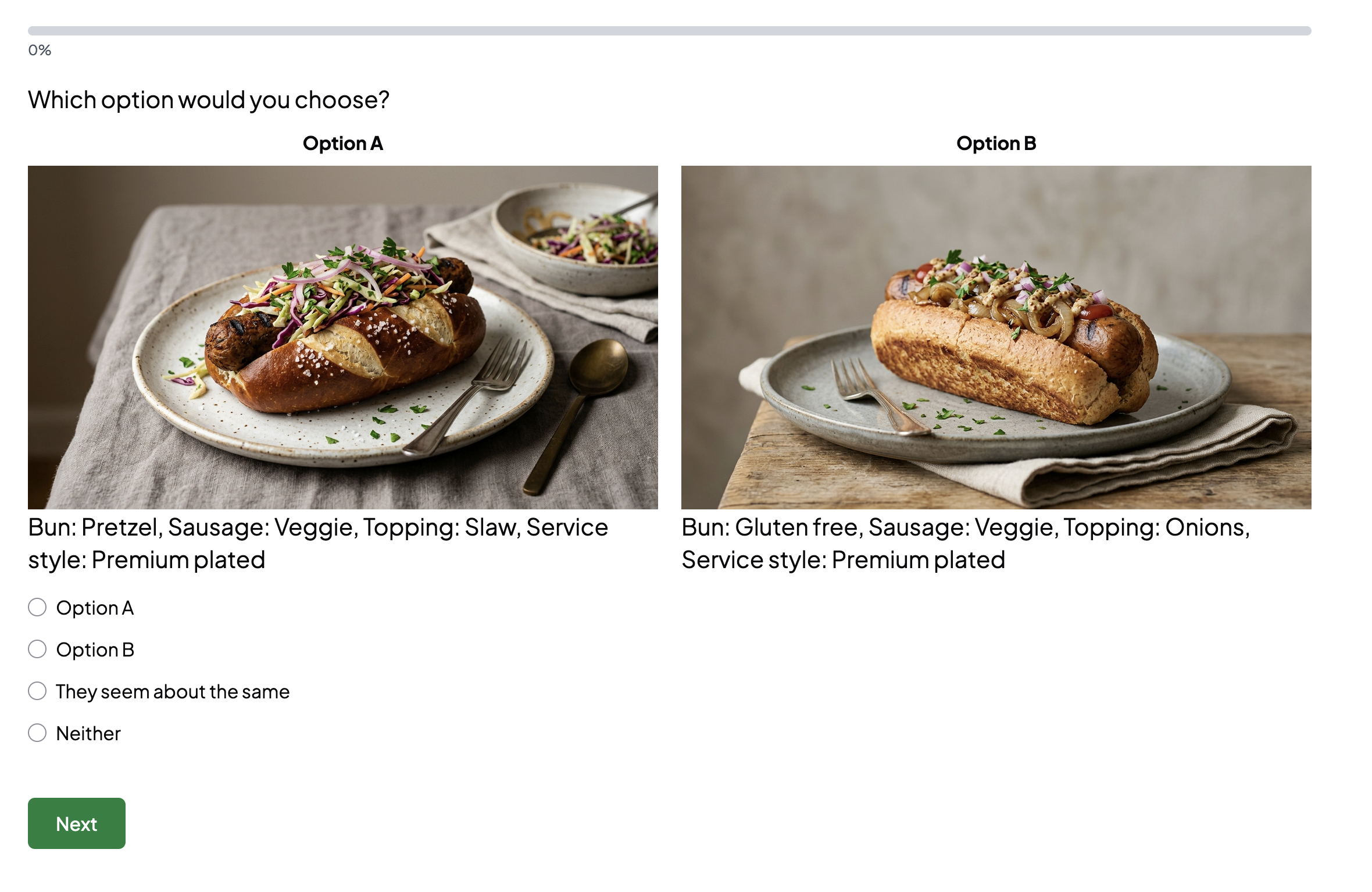
Let people take the comparison survey
preference build also writes humanize.json. It contains the radio-button schema and responsive CSS used to render the Markdown alternatives as two product cards. The same Survey and ScenarioList can therefore be answered by people through EDSL Humanize:
# Check the schema against the generated Survey.
edsl humanize schema validate \
  --survey .zwicky/preference/assessments/preference-a93e421c/human_survey.ep \
  --schema .zwicky/preference/assessments/preference-a93e421c/humanize.json

# Inspect the layout before publishing.
edsl humanize preview \
  --survey .zwicky/preference/assessments/preference-a93e421c/human_survey.ep \
  --schema .zwicky/preference/assessments/preference-a93e421c/humanize.json

# Publish the expanded respondent survey.
edsl humanize create \
  --survey .zwicky/preference/assessments/preference-a93e421c/human_survey.ep \
  --schema .zwicky/preference/assessments/preference-a93e421c/humanize.json \
  --name "Hot-dog preference elicitation"
human_survey.ep is different from the one-question survey.ep used by AI Jobs. Zwicky has already expanded every pair scenario into its own question, so one respondent sees the complete designed sequence. No Humanize scenario-assignment option is needed. humanize create returns JSON containing an admin_url, preview_url, and respondent_url.
edsl humanize responses <human-survey-uuid> \
  --output human-responses.ep

zwicky -C hot-dog preference ingest preference-a93e421c \
  --results human-responses.ep
zwicky -C hot-dog preference fit preference-a93e421c
Humanize responses are saved as an EDSL Results package, so they enter the same Zwicky ingestion and choice-model path as AI evaluator responses. The scenario columns preserve the exact A/B values and prices shown in every choice.
Learn a person, a panel, or both
| Elicitation goal | Design | Result |
|---|---|---|
| Population preference model | Invite many respondents to a balanced set of comparisons. | A pooled choice model and respondent/segment summaries. |
| Individual preference model | Give one respondent enough varied comparisons to estimate price and value trade-offs. | Respondent-specific coefficients, willingness-to-pay estimates, and diagnostics. |
| Behavioral digital twin | Retain that respondent’s observed choices and fitted preference profile; optionally pair them with separate background or open-text elicitation. | An Agent definition can use the profile as structured traits or instructions, while the fitted choice model provides a quantitative behavioral twin. |
Zwicky groups Humanize rows by respondent identifier when it is present. preference fit reports coefficients and willingness-to-pay separately for each respondent with enough completed choices, as well as for the pooled data. This supports two distinct handoffs: use the fitted coefficients directly to predict the person’s choices, or use their choice profile when constructing an EDSL Agent for later qualitative evaluation.
Worked Humanize result: one person, 36 choices, 72 predictions
The hot-dog elicitation was published as a 36-question Humanize survey and completed by one respondent. The response package contained one EDSL Results row with all 36 named answers. Zwicky expanded that row back into its designed pairs:
edsl humanize responses \
  11692194-f4da-4aa6-a9f6-e02a9c52a3b1 \
  --output human-responses.ep

zwicky -C hot-dog preference ingest preference-a542935b \
  --results human-responses.ep
zwicky -C hot-dog preference fit preference-a542935b \
--features main-effects --prior-precision 1| Observed response | Count |
|---|---|
| Option A | 17 |
| Option B | 16 |
| They seem about the same | 3 |
| Neither | 0 |
Because Neither was offered but never selected, Zwicky fitted the likelihood conditional on A versus B. This estimates price from differences between the two displayed prices; retaining an unchosen outside alternative would confound the absolute price level with the utility required for both offers to beat Neither. The conditional model converged in six iterations, achieved 84.9% in-sample accuracy on non-indifferent choices, and estimated a price coefficient of −0.065.
At a common $8 price, the top predicted configuration was Pretzel · Chicken · Slaw · Premium plated, followed by the same configuration with Chili and then Onions. The model predicts all 72 feasible hot dogs by recombining the learned categorical effects, even though the 36 pairs directly exercised 71 configurations.
Within-dimension coefficient contrasts imply approximately $4 more for Chicken than Beef and $2 more for Slaw than Onions. Larger estimates—about $22 for Pretzel over Classic and $16 for Premium plated over Street cart—mainly show that morphology dominated the relatively weak price response in this short exercise; the ordering is more stable than those exact dollar magnitudes.
The agent pattern for getting structured user input
- Build locally. Construct the balanced design and run
preference build. Report the number of tasks and the attributes being learned. - Publish externally. Run the returned
humanize_create_commandand parse its JSON response. - Hand control to the user. Present
data.respondent_urlas a link and ask the user to reply when finished. End the turn while they answer. - Resume from evidence. Download the completed Results with
edsl humanize responses; check completion and response counts before fitting. - Interpret the model. Report preference contrasts, price sensitivity, fit diagnostics, and ranked configurations. If more precision is useful, generate a smaller adaptive follow-up survey from the posterior.
Several human respondents
The same Humanize respondent URL can collect a panel rather than one person. edsl humanize responses returns all completed respondents in one Results package. Zwicky identifies the response rows by their stable human/agent identifier, expands every respondent’s long survey into pair records, and reports:
- respondent count and choices completed per respondent;
- pooled coefficients and configuration predictions;
- one preference profile per respondent with enough choices; and
- completion against respondents × designed pairs, rather than against a fixed one-person denominator.
A pooled model answers what the panel tends to choose. Respondent-level models preserve heterogeneity and can become individual behavioral twins. Named segments can be analyzed by joining respondent metadata or assignment information before fitting a hierarchical extension.
10 Fitting and extending pairwise choice models
Once comparisons have been answered by AI evaluators, real respondents, or both, fit the relative effects of morphological values and price. This chapter also shows how stored visual assets enter image-enabled comparison jobs.
Using stored images in comparison surveys
Chapter 5 creates and registers canonical option descriptions, writeups, and images. For a comparison job, export the selected image run and join its configuration-keyed FileStores onto the designed A/B pairs:
zwicky -C hot-dog images export image-run-47871b01 \
  --output hot-dog/option-images.ep
The answer to each image-generation question is an EDSL FileStore. Put the FileStores themselves in the comparison Scenario; there is no separate base64 or image-URL conversion step:
pair = Scenario({
    "config_a": "fafa5014f31f",
    "description_a": "Pretzel bun, chicken sausage, slaw, premium plated",
    "image_a": image_a,                 # an EDSL FileStore
    "config_b": "a2112fa4870c",
    "description_b": "Classic bun, beef sausage, onions, street cart",
    "image_b": image_b,                 # an EDSL FileStore
})

question_text = """## Which option would you choose?

{{ scenario.image_a }}

{{ scenario.description_a }}

{{ scenario.image_b }}

{{ scenario.description_b }}"""
The same native representation supports two delivery paths:
| Evaluator | How images travel | Question |
|---|---|---|
| Vision-capable model | EDSL recognizes the referenced FileStores and places the files in the model request. | The multiple-choice question can combine images, text attributes, and prices. |
| Humanize respondent | Humanize publishes the ScenarioList and renders each referenced FileStore as an .edsl-question-image. | The long Humanize Survey retains the same A/B/indifferent/Neither answers. |
Making the Humanize images side by side
Humanize separates question text at each FileStore placeholder. In the rendered DOM, the heading, image A, description A, image B, and description B become five sibling blocks. This means raw HTML around the placeholders is escaped, while a Markdown table receives empty cells because the images have been extracted from it. The working layout targets the emitted sibling blocks instead:
.edsl-question:has(.edsl-question-image) > div:first-child {
  display: grid;
  grid-template-columns: minmax(0, 1fr) minmax(0, 1fr);
  column-gap: 1.25rem;
}

/* Heading spans both columns. */
.edsl-question:has(.edsl-question-image)
  > div:first-child > div:nth-child(1) {
  grid-column: 1 / -1;
}

/* Image A and its description occupy the left column. */
.edsl-question:has(.edsl-question-image)
  > div:first-child > div:nth-child(2),
.edsl-question:has(.edsl-question-image)
  > div:first-child > div:nth-child(3) {
  grid-column: 1;
}

/* Image B and its description occupy the right column. */
.edsl-question:has(.edsl-question-image)
  > div:first-child > div:nth-child(4),
.edsl-question:has(.edsl-question-image)
  > div:first-child > div:nth-child(5) {
  grid-column: 2;
}

.edsl-question-image {
  width: auto;
  max-width: 100%;
  max-height: 42vh;
  margin: 0 auto;
  object-fit: contain;
}
The production example also assigns explicit grid rows, adds Option A and Option B labels with pseudo-elements, and collapses to one column below 640 pixels. Run it directly:
python examples/build_image_preference_humanize.py \
  --results hot-dog/preference-images-12.ep \
  --output-dir hot-dog/image-humanize \
  --publish \
  --name "Hot-dog image comparisons"
The builder passes {"survey": {"custom_css": ...}} as the humanize_schema to Jobs.humanize(..., scenario_list_method="loop"). The full responsive rules live in examples/humanize_image_comparison.css.
Images should be keyed by configuration ID, not pair ID. That requires 72 generations for the complete hot-dog box rather than two new generations for every comparison. A text-only control group can measure whether imagery changes the learned preferences; if it does, “presentation style” has become part of the experiment rather than neutral decoration.
The Bayesian choice model
Each alternative becomes a categorical feature vector x plus numeric price p. Its latent utility is a linear combination of morphological effects and price:
With an outside option, its utility is fixed at zero. Choice probabilities use the softmax function:
Without Neither, the denominator contains only A and B; this is the Bradley–Terry/logistic form. An indifference answer contributes a fractional likelihood—half A and half B—so it pulls their fitted utilities together without treating the response as rejection. Zwicky places a zero-centered Gaussian prior on the coefficients. The prior regularizes sparse levels and makes uncertainty available for the next comparison round.
zwicky -C hot-dog preference fit preference-a93e421c \
  --features main-effects \
--prior-precision 1.0 --human| Model output | Interpretation |
|---|---|
| Price coefficient γ | Change in latent utility for one currency unit of price. A negative estimate means higher prices reduce choice probability. |
| Morphological coefficients β | Jointly fitted contributions of buns, sausages, toppings, and service styles. |
| Approximate willingness to pay | For feature j, −βj/γ converts its utility contribution into the price units used in the design. |
| Configuration predictions | Predicted share for each exercised configuration at the reported median test price. |
| Segment summaries | Choice count, fitted price coefficient, accuracy, and log loss for each evaluator segment. |
| Posterior covariance | Remaining uncertainty about features and price, used to select informative follow-up pairs. |
main-effects is the natural starting point. main-plus-pairwise adds interactions such as Pretzel × Slaw, but needs substantially more varied choices to estimate them.
Choose the next comparisons adaptively
After the first fit, adaptive design scores candidate comparisons by posterior information. Pairs receive high priority when the model is uncertain about their utility difference and predicts a choice near 50/50. These are the comparisons most capable of changing what the model has learned.
zwicky -C hot-dog preference design \
  --all-configs \
  --pairs 20 \
  --price-levels 6,8,10 \
  --evaluators buyer-panel \
  --design adaptive \
  --model preference-model-61b84d2e \
  --seed 456
This begins a new EDSL round; it does not rescore every hot dog. Build, run, ingest, and refit using the same sequence. Direct ratings can continue alongside this workflow for absolute operational, cost, novelty, or safety criteria. Pairwise consumer choice supplies a different outcome: relative preference under explicit prices.
11 Multiple criteria
Dimensions describe; criteria evaluate
A morphological dimension is a choice used to construct a configuration: bun, sausage, topping, or service style. A criterion is a question used to evaluate the completed configuration: purchase intent, operational complexity, novelty, margin, accessibility, or deployment time. Dimensions define what a concept is; criteria measure how it performs.
This separation matters because the same value can help one objective and hurt another. Premium plated service might raise purchase appeal while also increasing operational complexity. Combining those judgments into the morphological box would hide the trade-off. Zwicky instead preserves one score per criterion and configuration.
criterion → one evaluative question about that concept
Defining the questions
Each criterion has five fields:
| Field | Purpose | Example |
|---|---|---|
| Name | Human-readable label used in tables and plots. | Purchase intent |
| Question | Exact valuation prompt presented before the complete configuration. | How likely would you be to purchase this configuration? |
| Direction | Whether larger raw values are better (maximize) or worse (minimize). | Maximize intent; minimize complexity. |
| Weight | Relative contribution to the optional composite summary. | Purchase intent receives weight 2. |
| Evaluators | The stakeholder or expert panel qualified to answer this question. | Consumers rate intent; a food-service expert rates cost. |
zwicky criteria add "Purchase intent" \
  --question "How likely would you be to purchase this configuration?" \
  --direction maximize --weight 2 \
  --evaluators traditionalists,adventurous-diners,health-conscious-diners

zwicky criteria add "Operational cost" \
  --question "How costly would this be to prepare and serve?" \
  --direction minimize --weight 1 \
  --evaluators food-service-operations-expert

zwicky criteria add "Novelty" \
  --question "How novel and differentiated is this configuration?" \
  --direction maximize --weight 1 \
  --evaluators traditionalists,adventurous-diners,health-conscious-diners

zwicky criteria list --human
The question should name the construct being rated and provide enough context for a consistent judgment. “How good is this?” collapses several ideas into one response. Purchase intent, operational complexity, and novelty produce separate answers that can later be compared, weighted, or plotted.
What gets scored—and by whom
For each configuration, the consumer panel answers purchase intent and novelty. The expert panel separately answers operational cost. Zwicky retains the evaluator identity with every score and computes each criterion mean over only its assigned panel.
The assessment selects criteria explicitly:
zwicky utility build \
  --sample sample-123 \
  --criteria purchase-intent,operational-cost,novelty \
  --scale 7
Omitting --criteria creates a single default “Overall utility” question. Explicit criteria are more useful when the decision contains recognizable trade-offs.
Putting maximize and minimize criteria on one orientation
Purchase intent and novelty already point upward: 7 is better than 1. Complexity points downward: 1 is better than 7. Zwicky preserves the raw answer, then reverses minimize criteria when calculating a composite. For a scale from 1 through L:
o(y)=L+1−y for minimize
On a seven-point scale, an operational-cost rating of 2.5 becomes an oriented value of 8−2.5=5.5. A cost rating of 6 becomes an oriented value of 2. After orientation, larger numbers consistently mean better performance.
What weights do
The composite score is a weighted average of the oriented criterion means:
With weights 2 for purchase intent, 1 for complexity, and 1 for novelty, a one-point change in purchase intent contributes twice as much to the numerator as a one-point change in either other criterion. Dividing by the total weight keeps the composite on the original 1–7 scale.
Worked comparison
| Concept | Intent ↑ | Complexity ↓ | Oriented complexity ↑ | Novelty ↑ | Weighted composite |
|---|---|---|---|---|---|
| A | 6.2 | 2.5 | 5.5 | 3.8 | (2×6.2 + 5.5 + 3.8)/4 = 5.43 |
| B | 5.6 | 1.8 | 6.2 | 5.9 | (2×5.6 + 6.2 + 5.9)/4 = 5.83 |
| C | 6.5 | 5.5 | 2.5 | 6.2 | (2×6.5 + 2.5 + 6.2)/4 = 5.43 |
Concept B ranks first under these weights because its low complexity and high novelty compensate for lower purchase intent. Increasing the purchase-intent weight could change that order. Zwicky therefore retains the raw criterion means so alternative weights can be examined without rerunning the interviews.
Composite ranking versus Pareto reasoning
A composite answers: “Which configuration scores highest under these particular weights?” Pareto analysis asks a different question: “Which configurations remain efficient without specifying exchange rates between criteria?” Weights affect the composite ranking but do not affect Pareto membership. The next chapter uses the separate criterion means to construct that frontier.
12 Pareto reasoning
Configuration a dominates b when a is at least as good on every selected criterion and strictly better on at least one, respecting each direction. The Pareto frontier contains all nondominated configurations.
zwicky -C hot-dog utility plot utility-735de643 --type pareto \
  --x purchase-intent --y operational-cost \
  --output writeup/pareto.svg

zwicky -C hot-dog utility portfolio utility-735de643 \
  --criteria purchase-intent,operational-cost,novelty \
  --size 8
The complete hot-dog frontier
The chart is generated from all 72 feasible hot-dog configurations using zwicky utility plot. Colored, labeled points lie on the frontier; gray points are dominated for the two displayed criteria. Hover over any point to see its configuration ID, complete morphological values, and criterion scores.
Both charts come from the same routed EDSL assessment. Three consumer personas supplied 432 purchase-intent and novelty scores; one food-service expert supplied 72 operational-cost scores. The run cost $0.049655 and was ingested as utility-735de643. Pareto membership is specific to the selected criteria.
Portfolio selection begins with the highest composite-scoring frontier point, then favors morphological Hamming distance. This reduces near-duplicates.
13 Categorical feature models
Random, coverage, and D-optimal sampling try to represent the feasible box without knowing which hot dogs customers will rate highly. That is the right starting point. Once the first EDSL job has been run and its results ingested, the objective changes from cover the design space to find strong outcomes efficiently while continuing to learn about uncertain parts of the space.
Turning a hot dog into model inputs
The adaptive model cannot operate directly on labels such as Pretzel and Slaw. Zwicky converts each configuration into a row of numbers: an intercept followed by one indicator for every morphological value.
For Pretzel + Veggie + Slaw + Street cart, the main-effect row is:
| Feature group | Ordered values | Encoded values |
|---|---|---|
| Intercept | Always present | 1 |
| Bun | Classic, Pretzel, Gluten free | 0, 1, 0 |
| Sausage | Beef, Chicken, Veggie | 0, 0, 1 |
| Topping | Onions, Chili, Slaw | 0, 0, 1 |
| Service style | Street cart, Fast casual, Premium plated | 1, 0, 0 |
The four-dimension hot-dog box therefore has 1 + 12 = 13 nominal main-effect features. A main-effect model learns a contribution for each selected value and adds those contributions to predict an outcome such as purchase intent. Because exactly one value is selected from each dimension, the columns contain known redundancies; Bayesian regularization stabilizes the fit, and Zwicky reports the estimable rank.
When combinations matter
A main-plus-pairwise model also includes cross-dimension interactions:
For the example above, Pretzel × Slaw = 1, while Classic × Slaw = 0. The hot-dog box has 54 cross-dimension pair features and 67 nominal features in total. This richer model can learn that Pretzel and Slaw work especially well together rather than assigning all of that lift to either ingredient alone. It also needs a larger and more varied scored sample. Start with main-effects; use main-plus-pairwise when interactions are important and the evaluation budget supports them.
The hot-dog handoff from initial design to adaptive search
First create an outcome-blind initial design. Here D-optimal sampling selects 14 configurations that make the 13-feature main-effects model estimable as efficiently as possible:
zwicky -C hot-dog sample create \
  --method d-optimal --features main-effects \
  --candidate-pool 72 --prior-precision 1 \
  --size 14 --seed 101 --human

sample_id: sample-f8d0d1f4
method: d-optimal
sample_size: 14
feature_count: 13
estimable_rank: 9
rows_per_feature: 1.0769
log_determinant: 16.9829
Build and run the evaluation, then ingest the returned scores. The EDSL run is the expensive step; everything after ingestion is local model fitting and selection.
zwicky -C hot-dog utility build --sample sample-f8d0d1f4 \
  --criteria purchase-intent

edsl run <jobs.ep> --output <results.ep>

zwicky -C hot-dog utility ingest utility-d43d28a2 \
  --results <results.ep>
zwicky -C hot-dog utility analyze utility-d43d28a2
Now fit a surrogate for the particular outcome the search should improve. This example uses purchase intent:
zwicky -C hot-dog model fit \
  --assessment utility-d43d28a2 \
  --criterion purchase-intent \
  --features main-effects --prior-precision 1 \
  --prediction-pool 72 --human

model_id: model-270f49de
criterion: Purchase intent (maximize)
training_configurations: 14
feature_count: 13
prediction_pool: 72
r_squared: 0.843926
rmse: 0.162921
The fitted model predicts purchase intent and uncertainty for the unscored hot dogs. A Bayesian acquisition rule then uses both quantities to choose the next 12 configurations:
zwicky -C hot-dog sample create \
  --method bayesian --surrogate model-270f49de \
  --acquisition ucb --candidate-pool 72 \
  --exploration 1.25 --diversity 0.25 \
  --size 12 --seed 202 --human

sample_id: sample-407db2ac
method: bayesian
sample_size: 12
unscored_candidates: 58
selected_predicted_mean: 5.029390
selected_mean_epistemic_std: 0.181186
values_covered: 10/12
pair_coverage: 29/53
This is the first outcome-informed sample: it is selected because of what the initial 14 consumer evaluations taught the model. Pooling the 12 follow-up configurations produced model-a144d834, trained on 26 configurations with RMSE 0.241842 and R² 0.638374.
The Sampling Designs chapter explains the D-optimal initial batch. Chapters 10 and 11 now develop the Bayesian surrogate and acquisition rule used after scores arrive.
14 Bayesian linear surrogate
Why fit a surrogate?
Suppose 80 of several thousand feasible hot dogs have received purchase-intent scores. We could simply rank those 80, but that says nothing about the unscored configurations. A surrogate is a fast statistical approximation to the expensive evaluator. It learns patterns from scored configurations, predicts scores for new ones, and attaches uncertainty to each prediction.
The surrogate does not call the digital twins again. It operates on the data already returned by the utility assessment. For one criterion at a time, Zwicky takes each configuration’s mean score as the target y and its categorical feature row as x. With main effects, the prediction is an intercept plus contributions from the selected morphological values:
With main-plus-pairwise, the prediction can also include terms such as Pretzel × Slaw. These interaction terms let a combination perform differently from the sum of its individual value effects.
A small numerical example
Consider an illustrative fitted main-effects model:
| Term active for this configuration | Estimated contribution |
|---|---|
| Intercept | 3.4 |
| Pretzel bun | +0.5 |
| Veggie sausage | −0.2 |
| Slaw topping | +0.4 |
| Street-cart service | +0.1 |
| Predicted purchase intent | 4.2 |
The arithmetic is 3.4 + 0.5 − 0.2 + 0.4 + 0.1 = 4.2. If Pretzel × Slaw has a +0.3 interaction in a pairwise model, the prediction becomes 4.5. Zwicky’s full categorical encoding uses regularization and a generalized inverse, so individual coefficients are best read as a jointly fitted decomposition; configuration-level predictions are the primary output.
Now suppose this concept has predicted mean 4.5 and epistemic standard deviation 0.8. Another familiar concept has mean 5.1 and epistemic standard deviation 0.3. The second currently looks stronger; the first is less certain and may be more informative to evaluate. Chapter 11 uses exactly this mean–uncertainty distinction to choose the next batch.
The Bayesian model
Let β contain all intercept, value, and optional pairwise coefficients. Before observing scores, Zwicky places a zero-centered Gaussian prior on β. The prior precision α controls shrinkage: larger α pulls effects more strongly toward zero. Observed scores are modeled as the linear prediction plus Gaussian residual noise with variance σ²:
After observing the feature matrix X and score vector y, Bayes’ rule produces another Gaussian distribution over the coefficients:
μ = ΣXTy/σ²
The posterior mean μ is the fitted coefficient vector. The posterior covariance Σ describes which effects remain uncertain and how their uncertainties move together. Zwicky estimates σ² from the training residuals, with a small floor to keep the model numerically stable.
For a new configuration with feature row x:
Varepistemic[y|x]=xTΣx
Varpredictive[y|x]=xTΣx+σ²
The predicted mean is the estimated score. Epistemic uncertainty measures uncertainty about the fitted response surface and shrinks when informative configurations are scored. Predictive uncertainty also includes residual variation σ², so it is larger. Acquisition policies use epistemic uncertainty because it identifies where another evaluation can teach the surrogate.
What model fit does
- Read the analyzed configuration means for the selected criterion.
- Reconstruct the main-effect or main-plus-pairwise feature matrix.
- Estimate residual noise and calculate the posterior mean and covariance.
- Draw a bounded implicit pool of feasible configurations without enumerating the full space.
- Write a predicted mean, epistemic standard deviation, and predictive standard deviation for every configuration in that pool.
- Save the model parameters, predictions, training IDs, and fit diagnostics as an auditable model artifact.
zwicky model fit \
  --assessment utility-initial \
  --criterion purchase-intent \
  --features main-plus-pairwise \
  --prior-precision 1 \
  --prediction-pool 10000 --human
Here --prediction-pool 10000 means “draw up to 10,000 feasible candidates and predict them,” not “materialize the entire morphological space.” A larger pool gives the subsequent acquisition step a broader search set and requires more feature-matrix memory and computation.
After a follow-up, pool analyzed assessments:
zwicky model fit \
  --assessment utility-initial utility-followup \
  --criterion purchase-intent \
  --features main-plus-pairwise
Pooling combines scores for configurations evaluated in different rounds and averages repeated scores for the same configuration. Re-fitting updates both predictions and uncertainty before the next acquisition batch.
Reading the output
| Output | Interpretation |
|---|---|
mean | Posterior predicted criterion score for a candidate. |
epistemic_std | Uncertainty about the estimated response surface at that candidate. |
predictive_std | Epistemic uncertainty plus estimated score noise. |
rmse | Typical in-sample residual size, in criterion-scale units. |
r_squared | Fraction of observed score variation represented in-sample. |
rows_per_feature | Training configurations divided by nominal feature count. |
noise_variance | Estimated residual variation not represented by the fitted feature terms. |
15 Acquisition policies
An acquisition function prioritizes unscored configurations. Zwicky reverses the orientation for minimize criteria.
Upper confidence bound
Thompson sampling
A plausible response surface is drawn. Selection balances exploration and exploitation implicitly, making the seed meaningful.
Uncertainty sampling
This ignores predicted utility and asks where a score would teach the model most under its assumptions.
Parallel-batch diversity
λ is --diversity. Diversity can lower immediate predicted performance but avoids spending a parallel batch on near-identical concepts.
zwicky sample create \
  --method bayesian \
  --surrogate model-123 \
  --acquisition ucb \
  --candidate-pool 10000 \
  --exploration 1.5 \
  --diversity 0.25 \
--size 100 --seed 456 --human| Policy | Best for | Disclosure |
|---|---|---|
| Thompson | Stochastic explore/exploit balance | The seed chooses one plausible surface. |
| UCB | Explicit optimism under uncertainty | Report κ and predicted-score concession. |
| Uncertainty | Learning or diagnosing the surface | No attempt is made to pursue utility. |
16 Worked product example: hot dogs
This example uses four three-valued dimensions, one hard incompatibility, three twin segments, and three criteria. Its evaluation figures and adaptive-search numbers come from an EDSL run completed with gpt-4.1-mini.
| Evaluator panel | Assigned criteria |
|---|---|
| Consumer twins: Traditionalists, Adventurous diners, Health-conscious diners | Purchase intent ↑, weight 2 Novelty ↑, weight 1 |
| Food-service operations expert | Operational cost ↓, weight 1 |
The box has 81 theoretical concepts. Veggie with beef-containing Chili removes nine, leaving 72 feasible concepts.
zwicky -C hot-dog utility build --all-configs \
  --criteria purchase-intent,operational-cost,novelty \
  --rationale none --batch-size 250 --human

edsl run jobs-panel-01.ep --model gpt-4.1-mini \
  --output consumer-results.ep
edsl run jobs-panel-02.ep --model gpt-4.1-mini \
  --output expert-results.ep

zwicky -C hot-dog utility ingest utility-735de643 \
  --results consumer-results.ep expert-results.ep
zwicky -C hot-dog utility analyze utility-735de643| Run fact | Observed value |
|---|---|
| Feasible configurations | 72 |
| Consumer personas | 3 |
| Food-service experts | 1 |
| Agent–configuration interviews | 288: 216 consumer + 72 expert |
| Numeric criterion scores | 504: 432 consumer + 72 expert |
| Model | gpt-4.1-mini |
| Recorded inference cost | $0.049655 |
Download the consumer Results and expert Results packages. Zwicky ingests both into one assessment. The adaptive chapters replay purchase-intent search using only consumer-panel scores.
The purchase-intent versus operational-cost and purchase-intent versus novelty plots each contain all 72 hot dogs. Each axis is supported by its assigned evaluator panel.
17 Hot-dog results: twins and fitted models
The aggregate ranking is only one view of the 504 ratings. The assessment can also show how the consumer perspectives differ, how the expert evaluates cost, which morphological values drive preference, and how well the adaptive surrogate generalizes.
How each twin used the criteria
The heatmap reveals response-level differences before any criterion weights are applied. Traditionalists averaged 3.33 on purchase intent, compared with 5.39 for adventurous diners and 4.58 for health-conscious diners. The expert’s mean operational-cost rating was 5.13. These are different constructs from different evaluator roles, joined at the configuration level rather than averaged as interchangeable opinions.
Which values drive purchase intent?
This is a descriptive marginal view: it answers questions such as whether the health-conscious twin scores Veggie above Beef, or whether Premium plated changes the adventurous twin’s ratings. Because the feasible box is not a perfectly independent factorial design after CCA pruning, these dots summarize observed configurations rather than claiming isolated causal effects. The fitted model below estimates the effects jointly.
Did the adaptive model learn the full response surface?
zwicky -C hot-dog model fit \
  --assessment utility-d43d28a2 \
  --criterion purchase-intent --features main-effects \
  --prediction-pool 72 --human

zwicky -C hot-dog model fit \
  --assessment utility-d43d28a2 utility-f72f4e33 \
  --criterion purchase-intent --features main-effects \
--prediction-pool 72 --humanThe 14-configuration model achieved training RMSE 0.163; its RMSE across all 72 configurations was 0.411 and its held-out RMSE was 0.451. After adding the 12 UCB-selected configurations, training RMSE was 0.242, all-configuration RMSE was 0.391, and held-out RMSE was 0.455. The adaptive batch improved error across the complete known box slightly while leaving error on the changing held-out set essentially flat.
This is the trade-off surfaced by adaptive search: the batch can concentrate evaluation on likely winners, reduce uncertainty in decision-relevant regions, or improve global model fidelity, but one acquisition rule does not maximize all three at once. The held-out plot makes that choice visible alongside the selected batch’s predicted mean, uncertainty, coverage, and exploitation cost.
18 Reporting, judgment, and audit
Zwicky does not write the final narrative. It converts the assessment into focused evidence artifacts so a report-writing agent does not have to reverse-engineer raw score rows. The hot-dog assessment below shows the complete handoff.
1. Preview: document what was actually run
utility preview reconstructs the study design: evaluator panels, assigned criteria, exact rendered questions, agent traits and instructions, scale endpoints, scenario text, expected counts, and EDSL commands. This is the source for the report’s methodology section.
zwicky -C hot-dog utility preview utility-735de643 \
  --examples 2 --human

agents: 4
configurations: 72
expected_interviews: 288
expected_numeric_scores: 504
evaluator_panels:
  consumer panel: 3 agents → purchase_intent, novelty
  expert panel:   1 agent  → operational_cost
examples:
  traditionalists → purchase_intent, novelty
  food-service-operations-expert → operational_cost
The two examples confirm that the consumer and expert see the same Classic + Beef + Onions + Street cart configuration but receive different questions.
2. Compare: turn configuration IDs into concept cards
utility compare joins each finalist to readable dimension values, criterion means, composite score, Pareto status, evaluator-specific scores, rationales, and the dimensions that differ. The report agent can use this directly for a side-by-side finalist table.
zwicky -C hot-dog utility compare utility-735de643 \
  --configs 1a775c381223 9aef2db02e8e 3995881316db --human

comparison_id: comparison-7c2f77cd
differing_dimensions: Sausage, Topping, Service style| Configuration | Concept | Intent ↑ | Cost ↓ | Novelty ↑ | Composite |
|---|---|---|---|---|---|
1a775c381223 | Pretzel · Veggie · Onions · Fast casual | 5.00 | 4 | 5.33 | 4.83 |
9aef2db02e8e | Pretzel · Veggie · Slaw · Street cart | 5.00 | 5 | 6.33 | 4.83 |
3995881316db | Pretzel · Chicken · Slaw · Fast casual | 4.67 | 4 | 5.67 | 4.75 |
All three are Pareto-efficient. The first two tie on the weighted composite for different reasons: the fast-casual Onions concept has lower expert-rated cost, while the street-cart Slaw concept has higher consumer-rated novelty.
3. Disagreement: identify segment-dependent concepts
utility disagreement calculates score dispersion and the range between evaluator-segment means for every configuration and criterion. It surfaces concepts whose aggregate mean conceals a sharply divided audience.
zwicky -C hot-dog utility disagreement utility-735de643 \
  --limit 10 --human

mean stakeholder range:
  purchase_intent: 2.5556
  novelty:         0.8472
  operational_cost: 0.0000

most divisive:
  Gluten free · Veggie · Onions · Premium plated
  purchase intent mean: 5.0
  Traditionalists: 2 · Adventurous: 6 · Health-conscious: 7
The zero cost range has a precise meaning: operational cost has one assigned expert, so there is no between-evaluator disagreement to calculate. Purchase intent is where the segment split occurs.
4. Sensitivity: vary the importance of the criteria
The baseline composite uses the declared 2:1:1 weights. utility sensitivity draws alternative nonnegative weight vectors that sum to one, reranks all configurations, and reports how often each concept wins plus its best, worst, and average rank.
zwicky -C hot-dog utility sensitivity utility-735de643 \
  --criteria purchase-intent,operational-cost,novelty \
  --draws 1000 --seed 123 --human

baseline weights: intent 0.50 · cost 0.25 · novelty 0.25
Pretzel · Veggie · Slaw · Street cart:
  baseline rank 2 · win share 40.0% · rank range 1–19
Pretzel · Veggie · Onions · Fast casual:
  baseline rank 1 · win share 5.0% · rank range 1–16
Pretzel · Chicken · Slaw · Fast casual:
  baseline rank 3 · win share 10.7% · rank range 1–20
The baseline leader is not the most frequent winner under alternative priorities. That gives the report a concrete conclusion: the recommendation depends on whether the decision emphasizes balanced baseline weights or the broader range of plausible priorities.
5. Shortlist: preserve efficient, distinct alternatives
utility shortlist starts with the highest-composite point on the selected-criteria Pareto frontier, then greedily adds frontier points that differ morphologically from those already chosen. Each row explains its inclusion, strongest criterion, principal trade-off, and distance from earlier selections.
zwicky -C hot-dog utility shortlist utility-735de643 \
  --criteria purchase-intent,operational-cost,novelty \
  --size 6 --human

shortlist_id: shortlist-f8aad270
frontier_count: 8
selected: 6
1. Pretzel · Veggie · Slaw · Street cart
   highest composite frontier point; novelty 6.33; cost 5
2. Gluten free · Chicken · Slaw · Fast casual
   three dimensions from #1; intent 5.33
3. Classic · Veggie · Onions · Fast casual
   three dimensions from earlier choices; cost 3
This is a decision set, not six restatements of the same winner. The report-writing agent can name the concepts, explain their distinct roles, and recommend which should advance to the next validation stage.
From artifacts to the report
The commands write JSON under .zwicky/utility/assessments/utility-735de643/decision/. The IDs above—comparison-7c2f77cd, sensitivity-ebc2214a, and shortlist-f8aad270—make every reported table traceable to its source artifact.
zwicky -C hot-dog guide
zwicky -C hot-dog report guide
zwicky -C hot-dog report template

# The separate report-writing agent produces:
writeup/report.md
guide reports which decision artifacts exist and which are still missing. report guide describes the available evidence and narrative requirements. report template provides the report structure. The writing agent then turns the artifacts into context, findings, trade-offs, recommendations, and next steps rather than copying tool output verbatim.